<?xml version="1.0" encoding="utf-8"?><feed xmlns="http://www.w3.org/2005/Atom" ><generator uri="https://jekyllrb.com/" version="4.4.1">Jekyll</generator><link href="https://www.aplura.com/feed.xml" rel="self" type="application/atom+xml" /><link href="https://www.aplura.com/" rel="alternate" type="text/html" /><updated>2026-02-12T15:28:24-05:00</updated><id>https://www.aplura.com/feed.xml</id><title type="html">Aplura</title><subtitle>Aplura, LLC is an Information Security consultancy in Baltimore, Maryland, specializing in Splunk, Cribl, Fortinet, Palo Alto Networks, and Gigamon. Many Solutions, One Goal.</subtitle><entry><title type="html">Aplura Selected as the Cribl North America Professional Services Partner of the Year</title><link href="https://www.aplura.com/news/cribl/awards/2026/02/12/aplura-cribl-north-american-partner-of-the-year.html" rel="alternate" type="text/html" title="Aplura Selected as the Cribl North America Professional Services Partner of the Year" /><published>2026-02-12T11:00:00-05:00</published><updated>2026-02-12T11:00:00-05:00</updated><id>https://www.aplura.com/news/cribl/awards/2026/02/12/aplura-cribl-north-american-partner-of-the-year</id><content type="html" xml:base="https://www.aplura.com/news/cribl/awards/2026/02/12/aplura-cribl-north-american-partner-of-the-year.html"><![CDATA[<p>We are excited to win Cribl’s <strong>North America Professional Services Partner of the Year Award</strong>! This honor reflects our commitment to driving transformative outcomes for global enterprises through deep collaboration with customers, Cribl, and other partners.</p>

<p>As a professional services partner, Aplura excels in delivering customer-centric solutions that empower organizations to leverage Cribl’s data engine for IT and security. Our focus on collaboration, continuous innovation, and measurable results has positioned us as a trusted advisor in key customer accounts, showcasing our ability to drive adoption of Cribl’s latest solutions.
This recognition underscores our dedication to empowering enterprises with flexibility, choice, and control when it comes to their data. We’re honored to contribute to the growth of Cribl’s ecosystem and look forward to continuing to deliver exceptional value to our partners and customers.</p>

<p>Thanks, Cribl!</p>

<p>See the list of winners <a href="https://bit.ly/4rrXVwP" target="_blank">here</a>.</p>

<p><img src="/assets/images/cribl-partner-award-fy26-aplura.png" alt="Aplura Cribl North America Professional Services Partner of the Year" /></p>]]></content><author><name></name></author><category term="Cribl" /><category term="Awards" /><summary type="html"><![CDATA[Aplura is the Cribl North America Professional Services Partner of the Year]]></summary></entry><entry><title type="html">Let’s revisit Storage Passwords!</title><link href="https://www.aplura.com/news/splunk/credentials/2025/10/09/storage_passwords.html" rel="alternate" type="text/html" title="Let’s revisit Storage Passwords!" /><published>2025-10-09T12:00:00-04:00</published><updated>2025-10-09T12:00:00-04:00</updated><id>https://www.aplura.com/news/splunk/credentials/2025/10/09/storage_passwords</id><content type="html" xml:base="https://www.aplura.com/news/splunk/credentials/2025/10/09/storage_passwords.html"><![CDATA[<p>Changes over the years have modified the requirements for the encrypted credentials (<code class="language-plaintext highlighter-rouge">/storage/passwords</code>) store, so it’s time to re-visit what is possible!</p>

<h2 id="tldr">TL;DR:</h2>

<ul>
  <li>Old versions of Splunk (&lt;=6.4) had a limitation of 255 bytes per credential.</li>
  <li>New versions of Splunk (&gt;=6.5) [since 2016] do <strong>NOT</strong> have a limit of characters per credential.</li>
  <li><a href="https://splunkbase.splunk.com/app/2962" target="_blank">Splunk’s Add-on Builder</a> still implements the old limitation within its configuration.</li>
  <li>Update your credentials using a script to allow for a single stanza compatible with Secure Password Stores!</li>
</ul>

<h2 id="history">History</h2>

<p>Way back when, in the years of Splunk Enterprise 4.3 (2012), a new feature was introduced called “Storage Passwords”.
This feature replaced the old endpoint <code class="language-plaintext highlighter-rouge">/admin/passwords</code> and allowed for more flexibility in storing encrypted secrets within Splunk.
The “new” endpoint is <code class="language-plaintext highlighter-rouge">/storage/passwords</code>, and has been in use for many iterations of the product.
However, when implemented initially, there was a limit of <code class="language-plaintext highlighter-rouge">255</code> bytes per credential.
This was presumably part of limitations in the code during that time (it was the wild west of course!).
It should be noted during my research, I could not find that limitation documented anywhere.</p>

<h2 id="so-what">So what?</h2>

<p>Because more recently, that limitation was removed. 
Being an older creature within the Splunk realm, I maintain backups of older copies of Splunk for research purposes.
So, I loaded up multiple versions of Splunk to see when that limitation was removed.
The winning version was Splunk 6.5, released in 2016. 
How did I test this?
Very simply, I generated a file with 43,700 bytes of <code class="language-plaintext highlighter-rouge">Lorem ipsum</code> and used the <code class="language-plaintext highlighter-rouge">curl</code> command to upload to the storage passwords endpoint.
I used a script to generate varying lengths of “credentials” and uploaded each difference size to the credential store.
Once uploaded, I ran an SPL command (found below in <a href="#references">References</a>) that gave me the Splunk version, and the results of the credential store.
I repeated for versions 5.0, 6.0, 6.1, 6.2, 6.3, 6.4, and 6.5.</p>

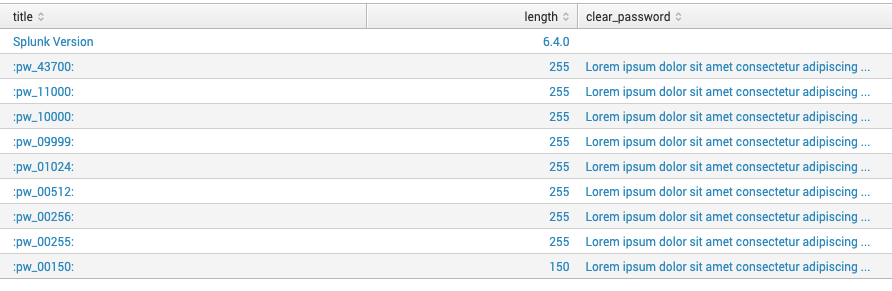
<p>As seen here, the results of the experiment for Splunk 6.4 show that no matter the length of the “credential”, the value was truncated to <code class="language-plaintext highlighter-rouge">255</code> characters.</p>
<figure>
    <img src="/assets/images/posts/storage_passwords/Splunk-6.4.0-SP-NoLimit.png" alt="Splunk 6.4 Credential Store" />
    <figcaption>Figure 1: Splunk 6.4 Credential Store with truncated credentials</figcaption>
</figure>

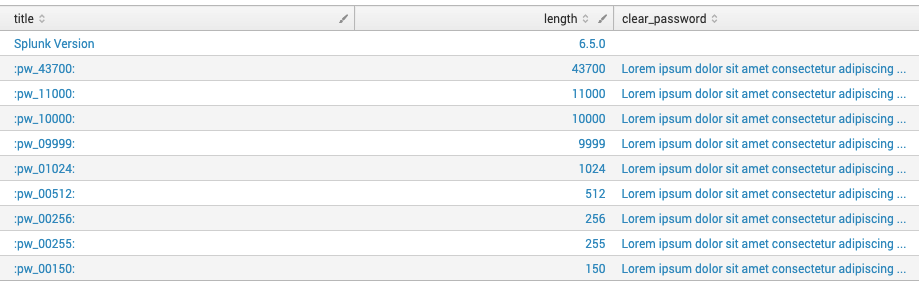
<p>Once I tested Splunk 6.5, I found that indeed the limit was removed and I can store full-fledged strings within the credential store. 
Once again, I failed to find any documentation on the change from <code class="language-plaintext highlighter-rouge">255</code> characters to <code class="language-plaintext highlighter-rouge">basically unlimited</code>.</p>
<figure>
    <img src="/assets/images/posts/storage_passwords/Splunk-6.5.0-SP-NoLimit.png" alt="Splunk 6.5 Credential Store" />
    <figcaption>Figure 2: Splunk 6.5 Credential Store with full credentials</figcaption>
</figure>

<h2 id="and-so">And So?</h2>

<p>Now we come to the crux of the issue.
<a href="https://splunkbase.splunk.com/app/2962" target="_blank">Splunk’s Add-on Builder</a> is used to create various Add-ons and Apps for Splunk.
This add-on has a release listed at Feb. 21, 2017 for version 2.1.0, listing compatibility for Splunk 6.4 AND 6.5, which bridges the versions with the limitation removal. 
The add-on utilizes (currently at least, it is unknown if earlier versions used the same library) the library <a href="https://pypi.org/project/solnlib" target="_blank">solnlib</a> to allow for various Splunk integrations.
It is in this library that (even as of today [<a href="https://github.com/splunk/addonfactory-solutions-library-python/blob/bd43e29c175ca374e0e251e409bc94c18dec4b1a/solnlib/credentials.py#L151" target="_blank">v7.0.0</a>]) the encrypted credential store code splits each credential up into stanzas of 255 characters. 
With AoB, each credential is split, and then encrypted individually within the <code class="language-plaintext highlighter-rouge">passwords.conf</code> file, so it is very difficult to update the credentials via configuration file using actual automation techniques.
Therefore a credential with length 1600 would be split into 6 stanzas, with a final stanza to determine “the end of the credential”.
The splitting of credentials is causing issues with automated credential rotation and integrations with newer credential management systems due to method in which the credentials are handled. 
This splitting of credentials is no longer required, and the AoB (and by extension <code class="language-plaintext highlighter-rouge">solnlib</code>) should be updated to use a single stanza per credential.</p>

<h2 id="now-what">Now What?</h2>

<p>Therefore, a script must be used to transform the old-style stanzas into a newer single credential per stanza, and disregard the splitting of the credentials.
To help remediate the issue, the python found <a href="/assets/images/posts/storage_passwords/convert-aob-cred.py">here</a> can be utilized to combine the multiple stanzas into a single credential that can used with AoB developed credential management.
It accepts new passwords over standard in from either a file or from a piped command, as well as inline with the command as the final argument.</p>

<div class="callout callout-note">
    <i class="fa fa-info-circle"></i>
    <b>Note:</b> It is not required to convert the passwords for AoB developed add-ons. This script should be used only by an authorized user, and when credential management is required without splitting the credential across stanzas.
</div>

<p>This script should be run anytime there are multiple stanzas for a single credential in a <code class="language-plaintext highlighter-rouge">passwords.conf</code> file, and need to be a singular stanza to handle rotations/updates from a CMS.</p>

<div class="callout callout-warning">
    <i class="fa fa-warning"></i>
    <b>Warning:</b> Please TEST the script in non-production. It is DESTRUCTIVE and will remove stanzas from the configuration file. We are not liable for any issues arising from the sample script.
</div>

<p>With the warnings out of the way, let’s discuss how this can be used.
This script requires the use of the Splunk provided python for specific libraries to find the <code class="language-plaintext highlighter-rouge">splunk.secret</code> for encryption and decryption.</p>

<p>On Linux based systems, this is the command to use Splunk’s python.</p>

<blockquote>
  <p>/opt/splunk/bin/splunk cmd python3</p>
</blockquote>

<p>Let’s assume we will be convert credentials for the app <code class="language-plaintext highlighter-rouge">IA-generic-app</code>.</p>

<div class="language-plaintext highlighter-rouge"><div class="highlight"><pre class="highlight"><code>cp convert-aob-cred.py /opt/splunk/etc/apps/IA-generic-app/bin
cd /opt/splunk/etc/apps/IA-generic-app/bin
</code></pre></div></div>

<p>For the actual execution, you will need the stanza name for the credential in question. 
That can be found by reviewing the <code class="language-plaintext highlighter-rouge">passwords.conf</code> file and extracting the information from the stanza.
It is also an option to grab it from the command line (Linux based), with varying results depending on the OS in use.</p>

<div class="language-plaintext highlighter-rouge"><div class="highlight"><pre class="highlight"><code>splunk cmd btool passwords list | grep REST_CREDENTIAL__ | awk -F "_#" '{print $2}' | awk -F "\`\`" '{print $1}' | sort | uniq
</code></pre></div></div>

<p>In our case, the stanza credential name will be <code class="language-plaintext highlighter-rouge">IA-generic-app#configs/conf-app_inputs:Sample</code>, which was pulled from a stanza</p>

<div class="language-plaintext highlighter-rouge"><div class="highlight"><pre class="highlight"><code>[credential:__REST_CREDENTIAL__#IA-generic-app#configs/conf-app_inputs:Sample``splunk_cred_sep``1:]
</code></pre></div></div>

<p>Once the credential name stub is found, execute the conversion on the <code class="language-plaintext highlighter-rouge">passwords.conf</code> file.</p>

<div class="callout callout-warning">
    <i class="fa fa-warning"></i>
    <b>Warning:</b> Again, this script is DESTRUCTIVE and will remove stanzas from the configuration file. We are not liable for any issues arising from the sample script.
</div>

<div class="language-plaintext highlighter-rouge"><div class="highlight"><pre class="highlight"><code>/opt/splunk/bin/splunk cmd python3 ./convert-aob-cred.py ../local/passwords.conf IA-generic-app#configs/conf-app_inputs:Sample
</code></pre></div></div>

<p>Once it runs, the stanzas will be updated within the <code class="language-plaintext highlighter-rouge">passwords.conf</code> file, to have a single stanza for the credential, and a second for the end delimiter to provide compatibility with AoB inputs.
It is also possible to update the password from the command line.</p>

<p class="codeblock-label">Consume StdOut from a command</p>

<pre><code class="language-with-tab">echo "new_password" | /opt/splunk/bin/splunk cmd python3 convert-aob-cred.py &lt;password_file&gt; &lt;input_name&gt; -
</code></pre>

<p class="codeblock-label">Consume contents of a file</p>

<pre><code class="language-with-tab">/opt/splunk/bin/splunk cmd python3 convert-aob-cred.py &lt;password_file&gt; &lt;input_name&gt; - &lt; &lt;filename&gt;
</code></pre>

<p class="codeblock-label">Just set via string</p>

<pre><code class="language-with-tab">/opt/splunk/bin/splunk cmd python3 convert-aob-cred.py &lt;password_file&gt; &lt;input_name&gt; "new_password"
</code></pre>
<div class="callout callout-note">
    <i class="fa fa-info-circle"></i>
    <b>Note:</b> The credential is decrypted/encrypted using the `splunk.secret` of the instance running the script, NOT the final destination instance (if other than the local instance)
</div>

<p>And that is it! 
The resulting updates should still be compatible with existing inputs, and are encrypted on disk.
Happy Converting!</p>

<h2 id="references">References</h2>

<ul>
  <li><a href="https://web.archive.org/web/20150427042005/http://docs.splunk.com/Documentation/Splunk/4.3/ReleaseNotes/MeetSplunk" target="_blank">Splunk 4.3 was released on January 10, 2012.</a></li>
  <li><a href="https://web.archive.org/web/20120706102454/http://docs.splunk.com/Documentation/Splunk/4.3.2/RESTAPI/RESTaccess#storage.2Fpasswords">Splunk 4.3 API Documentation</a></li>
  <li><a href="https://web.archive.org/web/20210512000729/https://docs.splunk.com/Documentation/Splunk/6.5.0/ReleaseNotes/MeetSplunk" target="_blank">Splunk Enterprise 6.5 was released on September 27, 2016.</a></li>
  <li><a href="https://web.archive.org/web/20170401215747/https://splunkbase.splunk.com/app/2962/#/details" target="_blank">Add on Builder 2.1.0 was released Feb. 21, 2017.</a></li>
</ul>

<p class="codeblock-label">SPL to verify credential lengths</p>

<pre><code class="language-with-tab">|rest splunk_server=local /servicesNS/-/-/storage/passwords  
| eval length=len(clear_password) 
| eval clear_password = substr(clear_password,0,50)."..." 
| table title length clear_password 
| append [ rest /services/server/info
    | table version
    | rename version as length 
    | eval title="Splunk Version"
    ] 
| stats values(*) as * by title 
| sort - title 
| table title length clear_password
</code></pre>]]></content><author><name>Kyle Smith</name></author><category term="Splunk" /><category term="Credentials" /><summary type="html"><![CDATA[Changes over the years have modified the requirements for the encrypted credentials (`/storage/passwords`) store, so it's time to re-visit what is possible!]]></summary></entry><entry><title type="html">Aplura Staff Inducted Into 2025 Splunk Trust</title><link href="https://www.aplura.com/news/splunk/splunktrust/community/awards/2025/08/28/aplura_splunk_trust_2025.html" rel="alternate" type="text/html" title="Aplura Staff Inducted Into 2025 Splunk Trust" /><published>2025-08-28T20:50:00-04:00</published><updated>2025-08-28T20:50:00-04:00</updated><id>https://www.aplura.com/news/splunk/splunktrust/community/awards/2025/08/28/aplura_splunk_trust_2025</id><content type="html" xml:base="https://www.aplura.com/news/splunk/splunktrust/community/awards/2025/08/28/aplura_splunk_trust_2025.html"><![CDATA[<p>Aplura is proud to share that <strong>three of our team members have once again been inducted into the <a href="https://community.splunk.com/t5/SplunkTrust/ct-p/splunk-trust" target="_blank">SplunkTrust</a></strong>, Splunk’s MVP program. This marks the <strong>tenth consecutive year</strong> that Aplura staff have been part of this distinguished group—a testament to their dedication and to the lasting impact of the SplunkTrust on the global Splunk community.</p>

<p>Please join us in congratulating this year’s honorees:</p>
<ul>
  <li><strong><a href="https://www.linkedin.com/in/keara-spoor-b01174129/" target="_blank">Keara Spoor</a></strong></li>
  <li><strong><a href="https://www.linkedin.com/in/david-shpritz-36144311/" target="_blank">David Shpritz</a></strong></li>
  <li><strong><a href="https://www.linkedin.com/in/alacer/" target="_blank">Kyle Smith</a></strong></li>
</ul>

<p>You can read the full announcement here: <a href="https://community.splunk.com/t5/Community-Blog/Congratulations-to-the-2025-2026-SplunkTrust/ba-p/752162" target="_blank">Congratulations to the 2025–2026 SplunkTrust!</a></p>

<p>We’d also like to extend our congratulations to all of the 2025–2026 SplunkTrust inductees. Each of these individuals demonstrates a remarkable passion for the Splunk community and serves as an outstanding ambassador.</p>

<p>And if you’re headed to <strong><a href="http://conf.splunk.com/" target="_blank">.conf in Boston</a></strong>, be sure to join us on <strong>Monday, September 8th</strong> for the <a href="https://conf.splunk.com/sessions/catalog.html?search=2764#/" target="_blank">SplunkTrust induction ceremony</a>. We’ll be there in the crowd, cheering our colleagues on!</p>]]></content><author><name>Aplura, LLC.</name></author><category term="Splunk" /><category term="SplunkTrust" /><category term="Community" /><category term="Awards" /><summary type="html"><![CDATA[Aplura celebrates three team members named to the 2025–2026 SplunkTrust, our tenth year of recognition.]]></summary></entry><entry><title type="html">Ingest Tenable SC Logs using Cribl Collectors</title><link href="https://www.aplura.com/news/cribl/tenable/2025/08/06/tenable_sc_logs_with_cribl.html" rel="alternate" type="text/html" title="Ingest Tenable SC Logs using Cribl Collectors" /><published>2025-08-06T08:00:00-04:00</published><updated>2025-08-06T08:00:00-04:00</updated><id>https://www.aplura.com/news/cribl/tenable/2025/08/06/tenable_sc_logs_with_cribl</id><content type="html" xml:base="https://www.aplura.com/news/cribl/tenable/2025/08/06/tenable_sc_logs_with_cribl.html"><![CDATA[<ul>
  <li><a href="#overview">Overview</a></li>
  <li><a href="#configuring-line-breakers">Configuring Line Breakers</a>
    <ul>
      <li><a href="#tenable-json-basic-ruleset">Tenable JSON Basic Ruleset</a></li>
      <li><a href="#tenable-json-asset-ruleset">Tenable JSON Asset Ruleset</a></li>
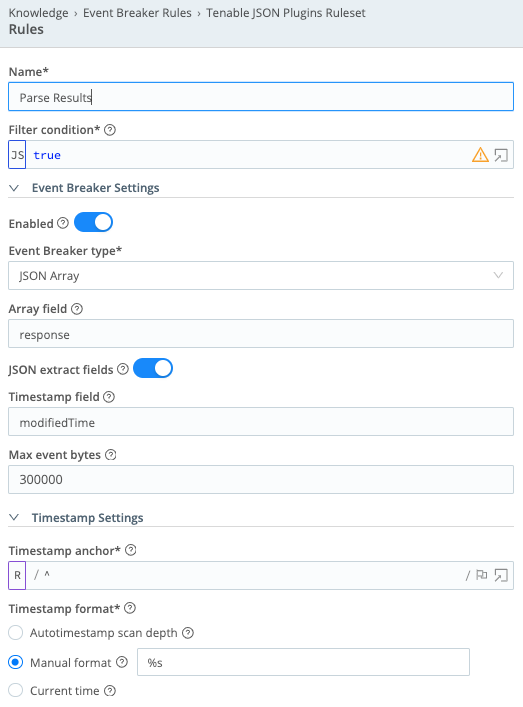
      <li><a href="#tenable-json-plugins-ruleset">Tenable JSON Plugins Ruleset</a></li>
    </ul>
  </li>
  <li><a href="#storing-the-tenable-api-host-in-variables">Storing the Tenable API Host in Variables</a></li>
  <li><a href="#storing-the-tenable-credentials-as-a-cribl-secret">Storing the Tenable Credentials as a Cribl Secret</a></li>
  <li><a href="#configuring-rest-collectors">Configuring REST Collectors</a>
    <ul>
      <li><a href="#tenable_sc_vuln">tenable_sc_vuln</a></li>
      <li><a href="#tenable_sc_vuln_patched">tenable_sc_vuln_patched</a></li>
      <li><a href="#tenable_sc_asset">tenable_sc_asset</a></li>
      <li><a href="#tenable_sc_plugin">tenable_sc_plugin</a></li>
    </ul>
  </li>
  <li><a href="#scheduling-collectors">Scheduling Collectors</a>
    <ul>
      <li><a href="#tenable_sc_vuln-1">tenable_sc_vuln</a></li>
      <li><a href="#tenable_sc_vuln_patched-1">tenable_sc_vuln_patched</a></li>
      <li><a href="#tenable_sc_asset-1">tenable_sc_asset</a></li>
      <li><a href="#tenable_sc_plugin-1">tenable_sc_plugin</a></li>
    </ul>
  </li>
  <li><a href="#processing-tenable-data-in-pipelines">Processing Tenable Data in Pipelines</a>
    <ul>
      <li><a href="#tenable_sc_vuln-2">tenable_sc_vuln</a></li>
      <li><a href="#tenable_sc_asset-2">tenable_sc_asset</a></li>
      <li><a href="#tenable_sc_plugin-2">tenable_sc_plugin</a></li>
    </ul>
  </li>
  <li><a href="#create-your-routes">Create Your Routes</a></li>
  <li><a href="#tenable-api-references">Tenable API References</a></li>
</ul>

<h1 id="overview">Overview</h1>

<p>We recently worked with a client that wanted to replace their Splunk Heavy Forwarder with a Cribl Stream worker. One of the challenges was that we needed to replace functionality of the <a href="https://splunkbase.splunk.com/app/4060" target="_blank">Tenable Add-On for Splunk</a> that pulls scan, asset and plugin data from the Tenable SC appliance. This document outlines the steps needed to setup that integration to act as a one-for-one replacement of the Splunk app inputs.</p>

<h1 id="configuring-line-breakers">Configuring Line Breakers</h1>

<p>The first step to setup the collectors is to create custom line breakers for the vulnerabilities, assets and plugins. When making requests to Tenable, the API server responds with a large JSON object with the data embedded in the JSON. The line breakers are slightly different for each type of requested data. These will instruct Cribl how to parse the data out of the JSON and assign appropriate timestamps to the logs.</p>

<ol>
  <li>In the Cribl Worker Group pages, go to <strong>Processing -&gt; Knowledge</strong>.</li>
  <li>Select <strong>Event Breaker Rules</strong> from the menu on the left.</li>
  <li>Click <strong>Add Ruleset</strong> for each of the types below. Assign the ID to be the name of each group title below. Then create a single rule in each, using the settings provided below.</li>
</ol>

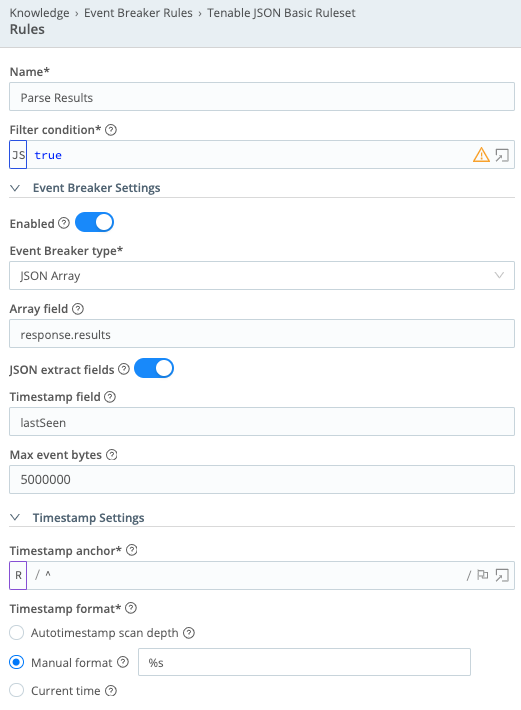
<h2 id="tenable-json-basic-ruleset">Tenable JSON Basic Ruleset</h2>

<ul>
  <li>Name = <code class="language-plaintext highlighter-rouge">Parse Results</code></li>
  <li>Filter condition = <code class="language-plaintext highlighter-rouge">true</code></li>
  <li>Event Breaker Settings – Enabled = On</li>
  <li>Event Breaker type = JSON Array</li>
  <li>Array field = <code class="language-plaintext highlighter-rouge">response.results</code></li>
  <li>JSON extract fields = On</li>
  <li>Timestamp field = <code class="language-plaintext highlighter-rouge">lastSeen</code></li>
  <li>Max event bytes = <code class="language-plaintext highlighter-rouge">5000000</code></li>
  <li>Timestamp anchor = <code class="language-plaintext highlighter-rouge">^</code></li>
  <li>Timestamp format = Manual format - <code class="language-plaintext highlighter-rouge">%s</code></li>
</ul>

<p><img src="/assets/images/posts/cribl_tenable_sc/tenable_json_basic_ruleset.png" alt="Tenable JSON Basic Ruleset screen" /></p>

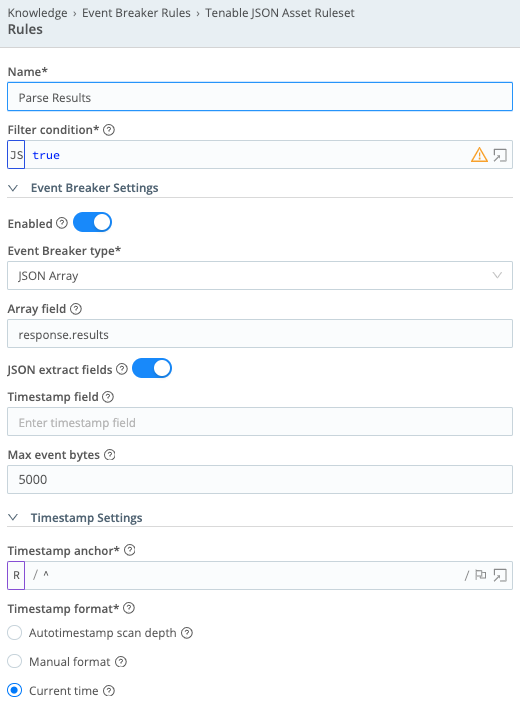
<h2 id="tenable-json-asset-ruleset">Tenable JSON Asset Ruleset</h2>

<ul>
  <li>Name = <code class="language-plaintext highlighter-rouge">Parse Results</code></li>
  <li>Filter condition = <code class="language-plaintext highlighter-rouge">true</code></li>
  <li>Event Breaker Settings – Enabled = On</li>
  <li>Event Breaker type = JSON Array</li>
  <li>Array field = <code class="language-plaintext highlighter-rouge">response.results</code></li>
  <li>JSON extract fields = On</li>
  <li>Timestamp field = (leave empty)</li>
  <li>Max event bytes = <code class="language-plaintext highlighter-rouge">5000</code></li>
  <li>Timestamp anchor = <code class="language-plaintext highlighter-rouge">^</code></li>
  <li>Timestamp format = Current time</li>
</ul>

<p><img src="/assets/images/posts/cribl_tenable_sc/tenable_json_asset_ruleset.png" alt="Tenable JSON Asset Ruleset screen" /></p>

<h2 id="tenable-json-plugins-ruleset">Tenable JSON Plugins Ruleset</h2>

<ul>
  <li>Name = <code class="language-plaintext highlighter-rouge">Parse Results</code></li>
  <li>Filter condition = <code class="language-plaintext highlighter-rouge">true</code></li>
  <li>Event Breaker Settings – Enabled = On</li>
  <li>Event Breaker type = JSON Array</li>
  <li>Array field = <code class="language-plaintext highlighter-rouge">response</code></li>
  <li>JSON extract fields = On</li>
  <li>Timestamp field = <code class="language-plaintext highlighter-rouge">modifiedTime</code></li>
  <li>Max event bytes = <code class="language-plaintext highlighter-rouge">300000</code></li>
  <li>Timestamp anchor = <code class="language-plaintext highlighter-rouge">^</code></li>
  <li>Timestamp format = Manual format - <code class="language-plaintext highlighter-rouge">%s</code></li>
</ul>

<p><img src="/assets/images/posts/cribl_tenable_sc/tenable_json_plugins_ruleset.png" alt="Tenable JSON Plugins Ruleset screen" /></p>

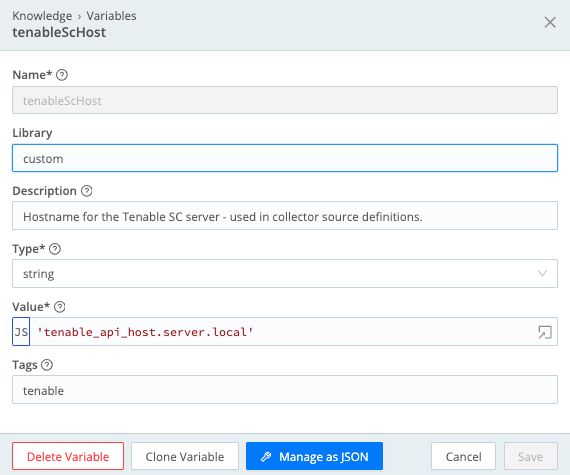
<h1 id="storing-the-tenable-api-host-in-variables">Storing the Tenable API Host in Variables</h1>

<p>As we create the Tenable ingests, we will reference the Tenable API endpoint in URLs to connect to. We will also add a host field to every event tagging it with the API host name. Given the repetitive nature of this data, we setup a variable in Cribl to track this and then reference that variable name in all the configurations. This also makes it easier to change later if the API server moves.</p>

<ol>
  <li>From the Cribl Worker Group configuration pages, go to <strong>Processing -&gt; Knowledge</strong>.</li>
  <li>Click on the <strong>Variables</strong> menu on the left side of the page.</li>
  <li>Click the <strong>Add Variable</strong> button.</li>
  <li>Set the following values and click <strong>Save</strong>.
    <ul>
      <li>Name = <code class="language-plaintext highlighter-rouge">tenableScHost</code></li>
      <li>Description = <code class="language-plaintext highlighter-rouge">Hostname for the Tenable SC server – used in collector source definitions.</code></li>
      <li>Type = string</li>
      <li>Value = (Set the value to be the IP or DNS name of the Tenable API server to connect to.)</li>
    </ul>
  </li>
</ol>

<p><img src="/assets/images/posts/cribl_tenable_sc/tenableschost_variable.png" alt="Creating the tenableScHost variable" /></p>

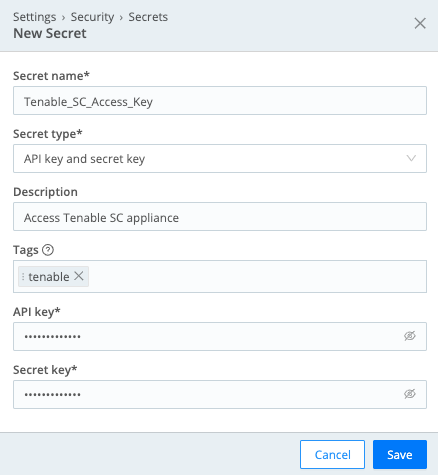
<h1 id="storing-the-tenable-credentials-as-a-cribl-secret">Storing the Tenable Credentials as a Cribl Secret</h1>

<p>We need to securely store the access and secret key needed to authentication to the Tenable API server. These will be stored as secrets in Cribl.</p>

<ol>
  <li>From the Cribl Worker Group configuration pages, go to <strong>Group Settings</strong>.</li>
  <li>Click on the <strong>Security</strong> menu on the left side of the page.</li>
  <li>Click on the <strong>Secrets</strong> menu.</li>
  <li>Click the <strong>Add Secret</strong> button.</li>
  <li>Set the following values and click <strong>Save</strong>.
    <ul>
      <li>Secret name = <code class="language-plaintext highlighter-rouge">Tenable_SC_Access_Key</code></li>
      <li>Secret type = API key and secret key</li>
      <li>Description = <code class="language-plaintext highlighter-rouge">Access Tenable SC appliance</code></li>
      <li>API key = (paste API key value)</li>
      <li>Secret key = (paste secret key value)</li>
    </ul>
  </li>
</ol>

<p><img src="/assets/images/posts/cribl_tenable_sc/tenable_credential_secret.png" alt="Creating the credential secret" /></p>

<h1 id="configuring-rest-collectors">Configuring REST Collectors</h1>

<p>With the line breakers, variables and credentials defined, we then create data sources to pull each of the data sets from Tenable. In the <strong>Data Sources</strong> page for a Cribl Worker Group, you will look for the <strong>Collectors REST</strong> type source and create new sources for each of the ingests below.</p>

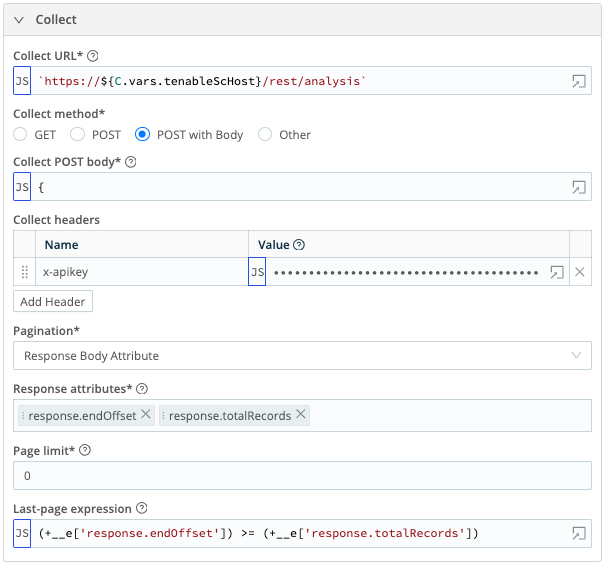
<h2 id="tenable_sc_vuln">tenable_sc_vuln</h2>

<p>Extracts the open and reopened vulnerabilities</p>

<ul>
  <li>Collect URL = <code class="language-plaintext highlighter-rouge">`https://${C.vars.tenableScHost}/rest/analysis`</code></li>
  <li>Collect method = POST with Body</li>
  <li>Collect POST body (NOTE: The filter against the lastSeen field is configured to use a state variable to track the last ingested date. This will get defined during the scheduling of this collector. If the state has not been previously set, it will default to the date 7 days prior to the current date.):</li>
</ul>

<div class="language-json highlighter-rouge"><div class="highlight"><pre class="highlight"><code><span class="p">{</span><span class="w">
    </span><span class="nl">"type"</span><span class="p">:</span><span class="w"> </span><span class="s2">"vuln"</span><span class="p">,</span><span class="w">
    </span><span class="nl">"sourceType"</span><span class="p">:</span><span class="w"> </span><span class="s2">"cumulative"</span><span class="p">,</span><span class="w">
    </span><span class="nl">"sortField"</span><span class="p">:</span><span class="w"> </span><span class="s2">"lastSeen"</span><span class="p">,</span><span class="w">
    </span><span class="nl">"sortDir"</span><span class="p">:</span><span class="w"> </span><span class="s2">"asc"</span><span class="p">,</span><span class="w">
    </span><span class="nl">"query"</span><span class="p">:</span><span class="w"> </span><span class="p">{</span><span class="w">
        </span><span class="nl">"tool"</span><span class="p">:</span><span class="w"> </span><span class="s2">"vulndetails"</span><span class="p">,</span><span class="w">
        </span><span class="nl">"type"</span><span class="p">:</span><span class="w"> </span><span class="s2">"vuln"</span><span class="p">,</span><span class="w">
        </span><span class="nl">"filters"</span><span class="p">:</span><span class="w"> </span><span class="p">[</span><span class="w">
            </span><span class="p">{</span><span class="nl">"filterName"</span><span class="p">:</span><span class="w"> </span><span class="s2">"lastSeen"</span><span class="p">,</span><span class="w"> </span><span class="nl">"operator"</span><span class="p">:</span><span class="w"> </span><span class="s2">"="</span><span class="p">,</span><span class="w"> </span><span class="nl">"value"</span><span class="p">:</span><span class="w"> </span><span class="err">`$</span><span class="p">{</span><span class="err">(state.since</span><span class="w"> </span><span class="err">+</span><span class="w"> </span><span class="mi">1</span><span class="err">)</span><span class="w"> </span><span class="err">||</span><span class="w"> </span><span class="err">(Math.floor((Date.now()</span><span class="w"> </span><span class="err">-</span><span class="w"> </span><span class="err">(</span><span class="mi">7</span><span class="w"> </span><span class="err">*</span><span class="w"> </span><span class="mi">24</span><span class="w"> </span><span class="err">*</span><span class="w"> </span><span class="mi">60</span><span class="w"> </span><span class="err">*</span><span class="w"> </span><span class="mi">60</span><span class="w"> </span><span class="err">*</span><span class="w"> </span><span class="mi">1000</span><span class="err">))/</span><span class="mi">1000</span><span class="err">))</span><span class="p">}</span><span class="err">-$</span><span class="p">{</span><span class="err">Math.floor((Date.now())/</span><span class="mi">1000</span><span class="err">)</span><span class="p">}</span><span class="err">`</span><span class="p">},</span><span class="w">
            </span><span class="p">{</span><span class="nl">"filterName"</span><span class="p">:</span><span class="w"> </span><span class="s2">"wasVuln"</span><span class="p">,</span><span class="w"> </span><span class="nl">"operator"</span><span class="p">:</span><span class="w"> </span><span class="s2">"="</span><span class="p">,</span><span class="w"> </span><span class="nl">"value"</span><span class="p">:</span><span class="w"> </span><span class="s2">"excludeWas"</span><span class="p">}</span><span class="w">
        </span><span class="p">],</span><span class="w">
        </span><span class="nl">"startOffset"</span><span class="p">:</span><span class="w"> </span><span class="err">(+__e</span><span class="p">[</span><span class="err">'response.endOffset'</span><span class="p">]</span><span class="w"> </span><span class="err">||</span><span class="w"> </span><span class="mi">0</span><span class="err">)</span><span class="p">,</span><span class="w">
        </span><span class="nl">"endOffset"</span><span class="p">:</span><span class="w"> </span><span class="err">((+__e</span><span class="p">[</span><span class="err">'response.endOffset'</span><span class="p">]</span><span class="w"> </span><span class="err">||</span><span class="w"> </span><span class="mi">0</span><span class="err">)</span><span class="w"> </span><span class="err">+</span><span class="w"> </span><span class="mi">200</span><span class="err">)</span><span class="w">
    </span><span class="p">}</span><span class="w">
</span><span class="p">}</span><span class="w">
</span></code></pre></div></div>
<ul>
  <li>Collect headers
    <ul>
      <li>Name: <code class="language-plaintext highlighter-rouge">x-apikey</code>, Value: <code class="language-plaintext highlighter-rouge">`accesskey=${C.Secret('Tenable_SC_Access_Key', 'keypair').* apiKey}; secretkey=${C.Secret('Tenable_SC_Access_Key', 'keypair').* secretKey};`</code></li>
    </ul>
  </li>
  <li>Pagination = Response Body Attribute</li>
  <li>Response attributes:
    <ul>
      <li>response.endOffset</li>
      <li>response.totalRecords</li>
    </ul>
  </li>
  <li>Page limit = <code class="language-plaintext highlighter-rouge">0</code></li>
  <li>Last-page expression = <code class="language-plaintext highlighter-rouge">(+__e['response.endOffset']) &gt;= (+__e* ['response.totalRecords'])</code></li>
  <li>Event Breaker rulesets – Select the Tenable JSON Basic Ruleset</li>
  <li>Fields:
    <ul>
      <li>Field Name: <code class="language-plaintext highlighter-rouge">host</code>, Value: <code class="language-plaintext highlighter-rouge">C.vars.tenableScHost</code></li>
    </ul>
  </li>
</ul>

<p><img src="/assets/images/posts/cribl_tenable_sc/tenable_sc_vuln_collector.png" alt="Collector overview for tenable_sc_vuln" /></p>

<p><img src="/assets/images/posts/cribl_tenable_sc/tenable_sc_vuln_results.png" alt="Results overview for tenable_sc_vuln" /></p>

<h2 id="tenable_sc_vuln_patched">tenable_sc_vuln_patched</h2>

<p>Retrieves the vulnerabilities that have been patched.</p>

<ul>
  <li>Collect URL = <code class="language-plaintext highlighter-rouge">`https://${C.vars.tenableScHost}/rest/analysis`</code></li>
  <li>Collect method = POST with Body</li>
  <li>Collect POST body (NOTE: The filter against the lastMitigated field is configured to use a state variable to track the last ingested date. This will get defined during the scheduling of this collector. If the state has not been previously set, it will default to the date 7 days prior to the current date.):</li>
</ul>

<div class="language-json highlighter-rouge"><div class="highlight"><pre class="highlight"><code><span class="p">{</span><span class="w">
    </span><span class="nl">"type"</span><span class="p">:</span><span class="w"> </span><span class="s2">"vuln"</span><span class="p">,</span><span class="w">
    </span><span class="nl">"sourceType"</span><span class="p">:</span><span class="w"> </span><span class="s2">"patched"</span><span class="p">,</span><span class="w">
    </span><span class="nl">"sortField"</span><span class="p">:</span><span class="w"> </span><span class="s2">"lastSeen"</span><span class="p">,</span><span class="w">
    </span><span class="nl">"sortDir"</span><span class="p">:</span><span class="w"> </span><span class="s2">"asc"</span><span class="p">,</span><span class="w">
    </span><span class="nl">"query"</span><span class="p">:</span><span class="w"> </span><span class="p">{</span><span class="w">
        </span><span class="nl">"tool"</span><span class="p">:</span><span class="w"> </span><span class="s2">"vulndetails"</span><span class="p">,</span><span class="w">
        </span><span class="nl">"type"</span><span class="p">:</span><span class="w"> </span><span class="s2">"vuln"</span><span class="p">,</span><span class="w">
        </span><span class="nl">"filters"</span><span class="p">:</span><span class="w"> </span><span class="p">[</span><span class="w">
            </span><span class="p">{</span><span class="nl">"filterName"</span><span class="p">:</span><span class="w"> </span><span class="s2">"lastMitigated"</span><span class="p">,</span><span class="w"> </span><span class="nl">"operator"</span><span class="p">:</span><span class="w"> </span><span class="s2">"="</span><span class="p">,</span><span class="w"> </span><span class="nl">"value"</span><span class="p">:</span><span class="w"> </span><span class="err">`$</span><span class="p">{</span><span class="err">(state.since</span><span class="w"> </span><span class="err">+</span><span class="w"> </span><span class="mi">1</span><span class="err">)</span><span class="w"> </span><span class="err">||</span><span class="w"> </span><span class="err">(Math.floor((Date.now()</span><span class="w"> </span><span class="err">-</span><span class="w"> </span><span class="err">(</span><span class="mi">7</span><span class="w"> </span><span class="err">*</span><span class="w"> </span><span class="mi">24</span><span class="w"> </span><span class="err">*</span><span class="w"> </span><span class="mi">60</span><span class="w"> </span><span class="err">*</span><span class="w"> </span><span class="mi">60</span><span class="w"> </span><span class="err">*</span><span class="w"> </span><span class="mi">1000</span><span class="err">))/</span><span class="mi">1000</span><span class="err">))</span><span class="p">}</span><span class="err">-$</span><span class="p">{</span><span class="err">Math.floor((Date.now())/</span><span class="mi">1000</span><span class="err">)</span><span class="p">}</span><span class="err">`</span><span class="p">},</span><span class="w">
            </span><span class="p">{</span><span class="nl">"filterName"</span><span class="p">:</span><span class="w"> </span><span class="s2">"wasVuln"</span><span class="p">,</span><span class="w"> </span><span class="nl">"operator"</span><span class="p">:</span><span class="w"> </span><span class="s2">"="</span><span class="p">,</span><span class="w"> </span><span class="nl">"value"</span><span class="p">:</span><span class="w"> </span><span class="s2">"excludeWas"</span><span class="p">}</span><span class="w">
        </span><span class="p">],</span><span class="w">
        </span><span class="nl">"startOffset"</span><span class="p">:</span><span class="w"> </span><span class="err">(+__e</span><span class="p">[</span><span class="err">'response.endOffset'</span><span class="p">]</span><span class="w"> </span><span class="err">||</span><span class="w"> </span><span class="mi">0</span><span class="err">)</span><span class="p">,</span><span class="w">
        </span><span class="nl">"endOffset"</span><span class="p">:</span><span class="w"> </span><span class="err">((+__e</span><span class="p">[</span><span class="err">'response.endOffset'</span><span class="p">]</span><span class="w"> </span><span class="err">||</span><span class="w"> </span><span class="mi">0</span><span class="err">)</span><span class="w"> </span><span class="err">+</span><span class="w"> </span><span class="mi">200</span><span class="err">)</span><span class="w">
    </span><span class="p">}</span><span class="w">
</span><span class="p">}</span><span class="w">
</span></code></pre></div></div>

<ul>
  <li>Collect headers
    <ul>
      <li>Name: <code class="language-plaintext highlighter-rouge">x-apikey</code>, Value: <code class="language-plaintext highlighter-rouge">`accesskey=${C.Secret('Tenable_SC_Access_Key', 'keypair').apiKey}; secretkey=$* {C.Secret('Tenable_SC_Access_Key', 'keypair').secretKey};`</code></li>
    </ul>
  </li>
  <li>Pagination = Response Body Attribute</li>
  <li>Response attributes:
    <ul>
      <li>response.endOffset</li>
      <li>response.totalRecords</li>
    </ul>
  </li>
  <li>Page limit = <code class="language-plaintext highlighter-rouge">0</code></li>
  <li>Last-page expression = <code class="language-plaintext highlighter-rouge">(+__e['response.endOffset']) &gt;= (+__e['response.totalRecords'])</code></li>
  <li>Event Breaker rulesets – Select the Tenable JSON Basic Ruleset</li>
  <li>Fields:
    <ul>
      <li>Field Name: <code class="language-plaintext highlighter-rouge">host</code>, Value: <code class="language-plaintext highlighter-rouge">C.vars.tenableScHost</code></li>
      <li>Field Name: <code class="language-plaintext highlighter-rouge">state</code>, Value: <code class="language-plaintext highlighter-rouge">'fixed'</code></li>
    </ul>
  </li>
</ul>

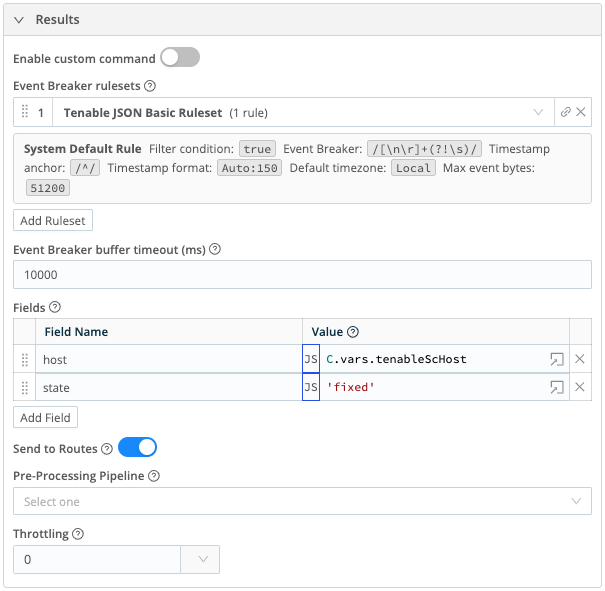
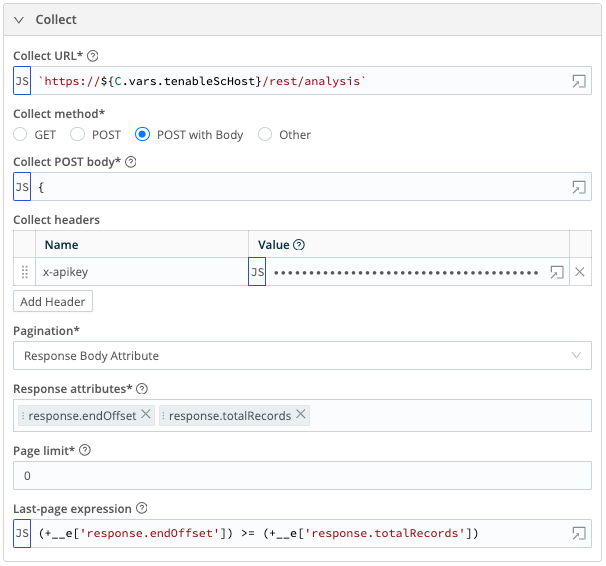
<p><img src="/assets/images/posts/cribl_tenable_sc/tenable_sc_vuln_patched_collector.png" alt="Collector overview for tenable_sc_vuln_patched" /></p>

<p><img src="/assets/images/posts/cribl_tenable_sc/tenable_sc_vuln_patched_results.png" alt="Results overview for tenable_sc_vuln_patched" /></p>

<h2 id="tenable_sc_asset">tenable_sc_asset</h2>

<p>Retrieves the aggregated asset data tracked by Tenable.</p>

<ul>
  <li>Collect URL = <code class="language-plaintext highlighter-rouge">`https://${C.vars.tenableScHost}/rest/analysis`</code></li>
  <li>Collect method = POST with Body</li>
  <li>Collect POST body (NOTE: The filter against the lastSeen field is configured to use a state variable to track the last ingested date. This will get defined during the scheduling of this collector. If the state has not been previously set, it will default to the date 7 days prior to the current date.):</li>
</ul>

<div class="language-json highlighter-rouge"><div class="highlight"><pre class="highlight"><code><span class="p">{</span><span class="w">
    </span><span class="nl">"type"</span><span class="p">:</span><span class="w"> </span><span class="s2">"vuln"</span><span class="p">,</span><span class="w">
    </span><span class="nl">"sourceType"</span><span class="p">:</span><span class="w"> </span><span class="s2">"cumulative"</span><span class="p">,</span><span class="w">
    </span><span class="nl">"sortField"</span><span class="p">:</span><span class="w"> </span><span class="s2">"lastSeen"</span><span class="p">,</span><span class="w">
    </span><span class="nl">"sortDir"</span><span class="p">:</span><span class="w"> </span><span class="s2">"asc"</span><span class="p">,</span><span class="w">
    </span><span class="nl">"query"</span><span class="p">:</span><span class="w"> </span><span class="p">{</span><span class="w">
        </span><span class="nl">"tool"</span><span class="p">:</span><span class="w"> </span><span class="s2">"sumip"</span><span class="p">,</span><span class="w">
        </span><span class="nl">"type"</span><span class="p">:</span><span class="w"> </span><span class="s2">"vuln"</span><span class="p">,</span><span class="w">
        </span><span class="nl">"filters"</span><span class="p">:</span><span class="w"> </span><span class="p">[</span><span class="w">
            </span><span class="p">{</span><span class="nl">"filterName"</span><span class="p">:</span><span class="w"> </span><span class="s2">"lastSeen"</span><span class="p">,</span><span class="w"> </span><span class="nl">"operator"</span><span class="p">:</span><span class="w"> </span><span class="s2">"="</span><span class="p">,</span><span class="w"> </span><span class="nl">"value"</span><span class="p">:</span><span class="w"> </span><span class="err">`$</span><span class="p">{</span><span class="err">Math.floor(state.since</span><span class="w"> </span><span class="err">||</span><span class="w"> </span><span class="err">((Date.now()</span><span class="w"> </span><span class="err">-</span><span class="w"> </span><span class="err">(</span><span class="mi">7</span><span class="w"> </span><span class="err">*</span><span class="w"> </span><span class="mi">24</span><span class="w"> </span><span class="err">*</span><span class="w"> </span><span class="mi">60</span><span class="w"> </span><span class="err">*</span><span class="w"> </span><span class="mi">60</span><span class="w"> </span><span class="err">*</span><span class="w"> </span><span class="mi">1000</span><span class="err">))/</span><span class="mi">1000</span><span class="err">))</span><span class="p">}</span><span class="err">-$</span><span class="p">{</span><span class="err">Math.floor((Date.now())/</span><span class="mi">1000</span><span class="err">)</span><span class="p">}</span><span class="err">`</span><span class="p">},</span><span class="w">
            </span><span class="p">{</span><span class="nl">"filterName"</span><span class="p">:</span><span class="w"> </span><span class="s2">"wasVuln"</span><span class="p">,</span><span class="w"> </span><span class="nl">"operator"</span><span class="p">:</span><span class="w"> </span><span class="s2">"="</span><span class="p">,</span><span class="w"> </span><span class="nl">"value"</span><span class="p">:</span><span class="w"> </span><span class="s2">"excludeWas"</span><span class="p">}</span><span class="w">
        </span><span class="p">],</span><span class="w">
        </span><span class="nl">"startOffset"</span><span class="p">:</span><span class="w"> </span><span class="err">(+__e</span><span class="p">[</span><span class="err">'response.endOffset'</span><span class="p">]</span><span class="w"> </span><span class="err">||</span><span class="w"> </span><span class="mi">0</span><span class="err">)</span><span class="p">,</span><span class="w">
        </span><span class="nl">"endOffset"</span><span class="p">:</span><span class="w"> </span><span class="err">((+__e</span><span class="p">[</span><span class="err">'response.endOffset'</span><span class="p">]</span><span class="w"> </span><span class="err">||</span><span class="w"> </span><span class="mi">0</span><span class="err">)</span><span class="w"> </span><span class="err">+</span><span class="w"> </span><span class="mi">200</span><span class="err">)</span><span class="w">
    </span><span class="p">}</span><span class="w">
</span><span class="p">}</span><span class="w">
</span></code></pre></div></div>

<ul>
  <li>Collect headers
    <ul>
      <li>Name: <code class="language-plaintext highlighter-rouge">x-apikey</code>, Value: <code class="language-plaintext highlighter-rouge">`accesskey=${C.Secret('Tenable_SC_Access_Key', 'keypair').apiKey}; secretkey=$* {C.Secret('Tenable_SC_Access_Key', 'keypair').secretKey};`</code></li>
    </ul>
  </li>
  <li>Pagination = Response Body Attribute</li>
  <li>Response attributes:
    <ul>
      <li>response.endOffset</li>
      <li>response.totalRecords</li>
    </ul>
  </li>
  <li>Page limit = <code class="language-plaintext highlighter-rouge">0</code></li>
  <li>Last-page expression = <code class="language-plaintext highlighter-rouge">(+__e['response.endOffset']) &gt;= (+__e['response.totalRecords'])</code></li>
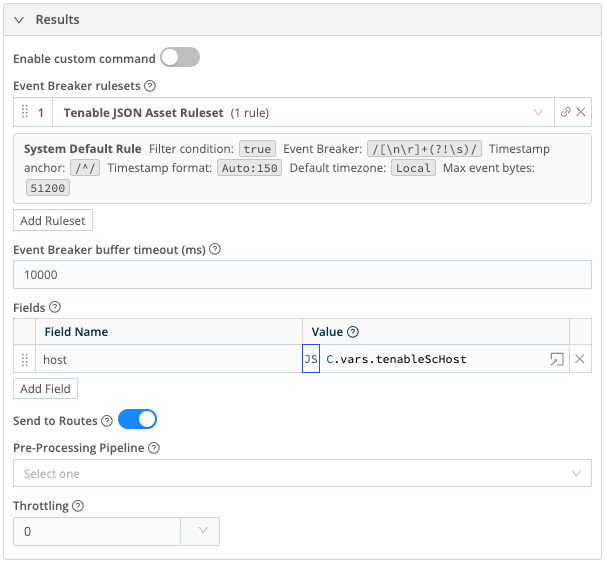
  <li>Event Breaker rulesets – Select the Tenable JSON Asset Ruleset</li>
  <li>Fields:
    <ul>
      <li>Field Name: <code class="language-plaintext highlighter-rouge">host</code>, Value: <code class="language-plaintext highlighter-rouge">C.vars.tenableScHost</code></li>
    </ul>
  </li>
</ul>

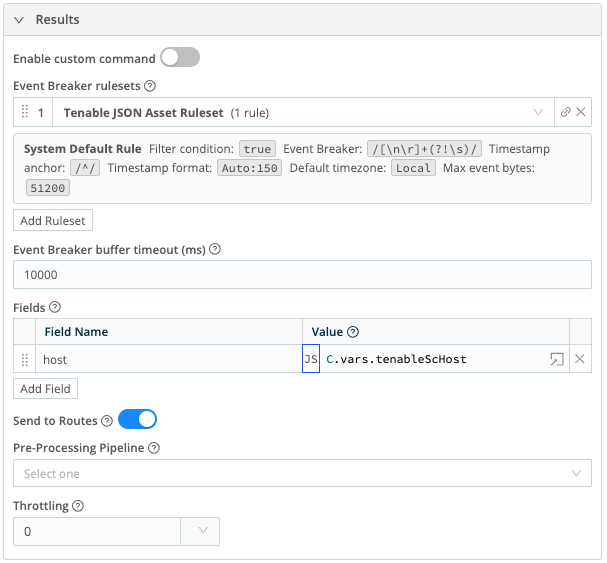
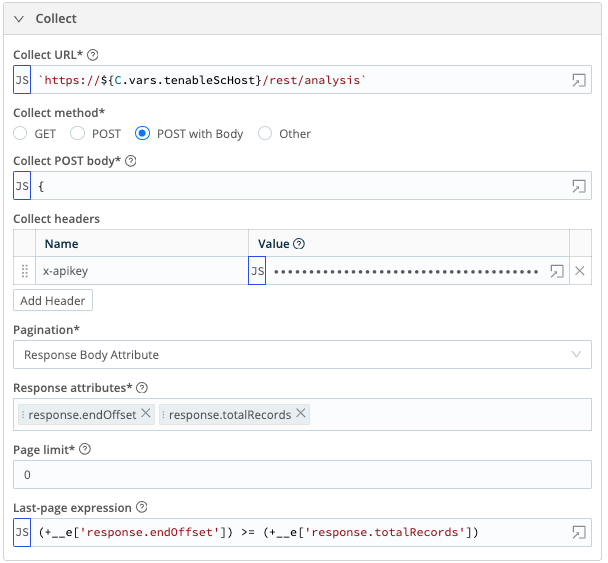
<p><img src="/assets/images/posts/cribl_tenable_sc/tenable_sc_asset_collector.png" alt="Collector overview for tenable_asset_plugin" /></p>

<p><img src="/assets/images/posts/cribl_tenable_sc/tenable_sc_asset_results.png" alt="Results overview for tenable_asset_plugin" /></p>

<h2 id="tenable_sc_plugin">tenable_sc_plugin</h2>

<p>Retrieves details about the plugin definitions as they are updated.</p>

<ul>
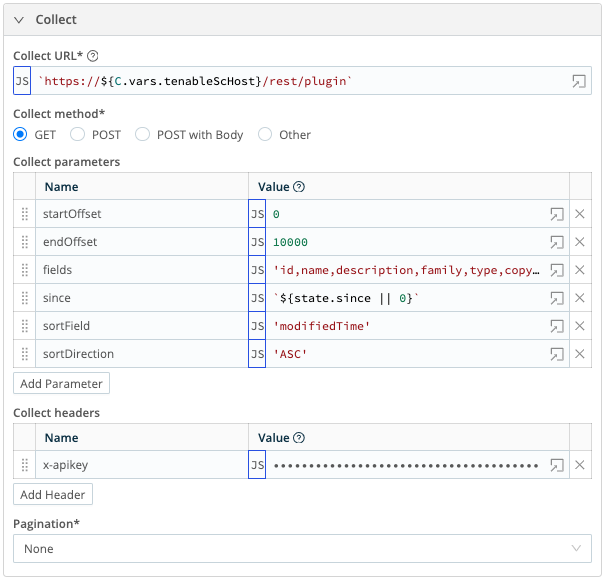
  <li>Collect URL = <code class="language-plaintext highlighter-rouge">`https://${C.vars.tenableScHost}/rest/plugin`</code></li>
  <li>Collect method = GET</li>
  <li>Collect parameters:
    <ul>
      <li>Name: <code class="language-plaintext highlighter-rouge">startOffset</code>, Value: <code class="language-plaintext highlighter-rouge">0</code></li>
      <li>Name: <code class="language-plaintext highlighter-rouge">endOffset</code>, Value: <code class="language-plaintext highlighter-rouge">10000</code></li>
      <li>Name: <code class="language-plaintext highlighter-rouge">fields</code>, Value: <code class="language-plaintext highlighter-rouge">'id,name,description,family,type,copyright,version,sourceFile,dependencies, requiredPorts,requiredUDPPorts,cpe,srcPort,dstPort,protocol,riskFactor,solution,seeAlso, synopsis,checkType,exploitEase,exploitAvailable,exploitFrameworks,cvssVector,cvssVectorBF, baseScore,temporalScore,stigSeverity,pluginPubDate,pluginModDate,patchPubDate,patchModDate, vulnPubDate,modifiedTime,md5,xrefs,vprScore,vprContext'</code></li>
      <li>Name: <code class="language-plaintext highlighter-rouge">since</code>, Value: <code class="language-plaintext highlighter-rouge">`${state.since || 0}`</code></li>
      <li>Name: <code class="language-plaintext highlighter-rouge">sortField</code>, Value: <code class="language-plaintext highlighter-rouge">'modifiedTime'</code></li>
      <li>Name: <code class="language-plaintext highlighter-rouge">sortDirection</code>, Value: <code class="language-plaintext highlighter-rouge">'ASC'</code></li>
    </ul>
  </li>
  <li>Collect headers
    <ul>
      <li>Name: <code class="language-plaintext highlighter-rouge">x-apikey</code>, Value: <code class="language-plaintext highlighter-rouge">`accesskey=${C.Secret('Tenable_SC_Access_Key', 'keypair').apiKey}; secretkey=${C.Secret* ('Tenable_SC_Access_Key', 'keypair').secretKey};`</code></li>
    </ul>
  </li>
  <li>Pagination = None</li>
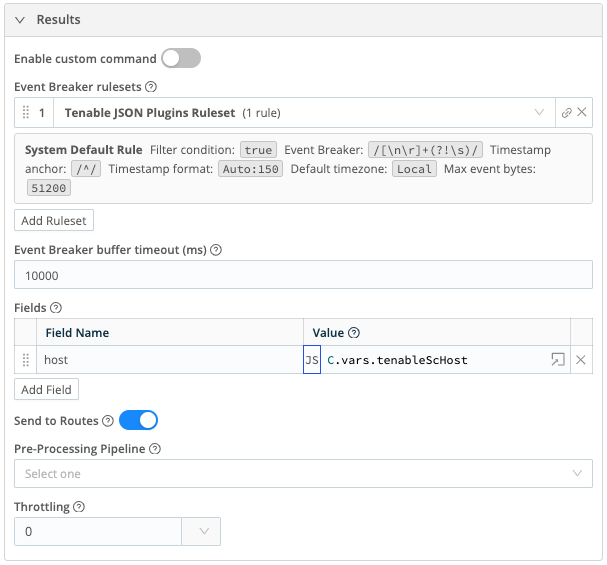
  <li>Event Breaker rulesets – Select the Tenable JSON Plugins Ruleset</li>
  <li>Fields:
    <ul>
      <li>Field Name: <code class="language-plaintext highlighter-rouge">host</code>, Value: <code class="language-plaintext highlighter-rouge">C.vars.tenableScHost</code></li>
    </ul>
  </li>
</ul>

<p><img src="/assets/images/posts/cribl_tenable_sc/tenable_sc_plugin_collector.png" alt="Collector overview for tenable_sc_plugin" /></p>

<p><img src="/assets/images/posts/cribl_tenable_sc/tenable_sc_plugin_results.png" alt="Results overview for tenable_sc_plugin" /></p>

<h1 id="scheduling-collectors">Scheduling Collectors</h1>

<p>With the four collectors defined, we need to setup schedules to periodically make the REST calls to Tenable and pull the data. The schedules also define the logic for setting up state variables. These variables track dates from previous runs that are incremented so that Cribl doesn’t duplicate data on future runs.</p>

<p>From your list of REST collector sources, you will click on the <strong>Schedule</strong> button to define each of the schedules below. NOTE: The cron schedules are arbitrary and can be adjusted to meet your needs. They are designed to not run on the quarter hours which are popular times to run jobs:</p>

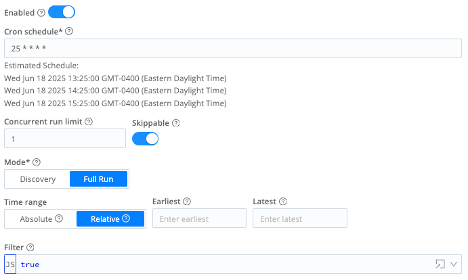
<h2 id="tenable_sc_vuln-1">tenable_sc_vuln</h2>

<ul>
  <li>Enabled = On</li>
  <li>Cron schedule = <code class="language-plaintext highlighter-rouge">25 * * * *</code></li>
  <li>Concurrent run limit = <code class="language-plaintext highlighter-rouge">1</code></li>
  <li>Skippable = On</li>
  <li>Mode = Full Run</li>
  <li>Time range = Relative</li>
  <li>Earliest = (leave blank)</li>
  <li>Latest = (leave blank)</li>
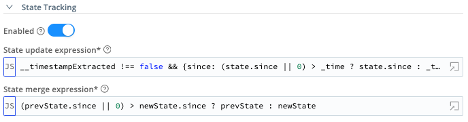
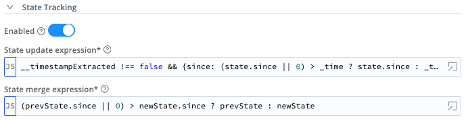
  <li>State Tracking – Enabled = On</li>
  <li>State update expression = <code class="language-plaintext highlighter-rouge">__timestampExtracted !== false &amp;&amp; {since: (state.since || 0) &gt; _time ? state.since : _time}</code></li>
  <li>State merge expression = <code class="language-plaintext highlighter-rouge">(prevState.since || 0) &gt; newState.since ? prevState : newState</code></li>
</ul>

<p><img src="/assets/images/posts/cribl_tenable_sc/tenable_sc_vuln_schedule.png" alt="Schedule for tenable_sc_vuln" /></p>

<p><img src="/assets/images/posts/cribl_tenable_sc/tenable_sc_vuln_schedule_state.png" alt="Schedule state for tenable_sc_vuln" /></p>

<h2 id="tenable_sc_vuln_patched-1">tenable_sc_vuln_patched</h2>

<ul>
  <li>Enabled = On</li>
  <li>Cron schedule = <code class="language-plaintext highlighter-rouge">25 * * * *</code></li>
  <li>Concurrent run limit = <code class="language-plaintext highlighter-rouge">1</code></li>
  <li>Skippable = On</li>
  <li>Mode = Full Run</li>
  <li>Time range = Relative</li>
  <li>Earliest = (leave blank)</li>
  <li>Latest = (leave blank)</li>
  <li>State Tracking – Enabled = On</li>
  <li>State update expression = <code class="language-plaintext highlighter-rouge">__timestampExtracted !== false &amp;&amp; {since: (state.since || 0) &gt; _time ? state.since : _time}</code></li>
  <li>State merge expression = <code class="language-plaintext highlighter-rouge">(prevState.since || 0) &gt; newState.since ? prevState : newState</code></li>
</ul>

<p><img src="/assets/images/posts/cribl_tenable_sc/tenable_sc_vuln_patched_schedule.png" alt="Schedule for tenable_sc_vuln_patched" /></p>

<p><img src="/assets/images/posts/cribl_tenable_sc/tenable_sc_vuln_patched_schedule_state.png" alt="Schedule state for tenable_sc_vuln_patched" /></p>

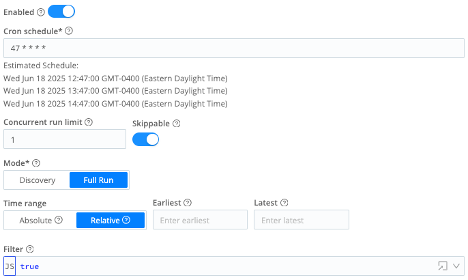
<h2 id="tenable_sc_asset-1">tenable_sc_asset</h2>

<ul>
  <li>Enabled = On</li>
  <li>Cron schedule = <code class="language-plaintext highlighter-rouge">47 * * * *</code></li>
  <li>Concurrent run limit = <code class="language-plaintext highlighter-rouge">1</code></li>
  <li>Skippable = On</li>
  <li>Mode = Full Run</li>
  <li>Time range = Relative</li>
  <li>Earliest = (leave blank)</li>
  <li>Latest = (leave blank)</li>
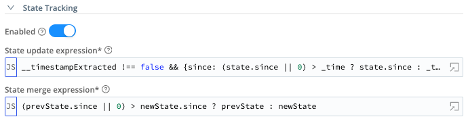
  <li>State Tracking – Enabled = On</li>
  <li>State update expression = <code class="language-plaintext highlighter-rouge">__timestampExtracted !== false &amp;&amp; {since: (state.since || 0) &gt; _time ? state.since : _time}</code></li>
  <li>State merge expression = <code class="language-plaintext highlighter-rouge">(prevState.since || 0) &gt; newState.since ? prevState : newState</code></li>
</ul>

<p><img src="/assets/images/posts/cribl_tenable_sc/tenable_sc_asset_schedule.png" alt="Schedule for tenable_sc_asset" /></p>

<p><img src="/assets/images/posts/cribl_tenable_sc/tenable_sc_asset_schedule_state.png" alt="Schedule state for tenable_sc_asset" /></p>

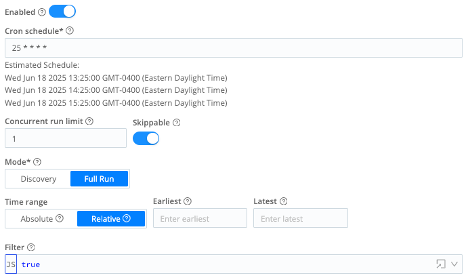
<h2 id="tenable_sc_plugin-1">tenable_sc_plugin</h2>

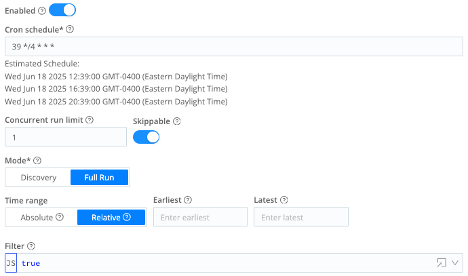
<ul>
  <li>Enabled = On</li>
  <li>Cron schedule = <code class="language-plaintext highlighter-rouge">39 */4 * * *</code></li>
  <li>Concurrent run limit = <code class="language-plaintext highlighter-rouge">1</code></li>
  <li>Skippable = On</li>
  <li>Mode = Full Run</li>
  <li>Time range = Relative</li>
  <li>Earliest = (leave blank)</li>
  <li>Latest = (leave blank)</li>
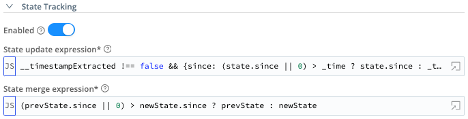
  <li>State Tracking – Enabled = On</li>
  <li>State update expression = <code class="language-plaintext highlighter-rouge">__timestampExtracted !== false &amp;&amp; {since: (state.since || 0) &gt; _time ? state.since : _time}</code></li>
  <li>State merge expression = <code class="language-plaintext highlighter-rouge">(prevState.since || 0) &gt; newState.since ? prevState : newState</code></li>
</ul>

<p><img src="/assets/images/posts/cribl_tenable_sc/tenable_sc_plugin_schedule.png" alt="Schedule for tenable_sc_plugin" /></p>

<p><img src="/assets/images/posts/cribl_tenable_sc/tenable_sc_plugin_schedule_state.png" alt="Schedule state for tenable_sc_plugin" /></p>

<h1 id="processing-tenable-data-in-pipelines">Processing Tenable Data in Pipelines</h1>

<p>Finally, we need to do some processing of this data as it passes through Cribl. The Splunk TA for Tenable has some logic to manipulate the data before storing it in Splunk. The following pipelines are designed to replicate those changes. Create a new pipeline for each section and then create the functions per the instructions given.</p>

<h2 id="tenable_sc_vuln-2">tenable_sc_vuln</h2>

<p>The first pipeline is for processing logs from the tenable_sc_vuln and tenable_sc_vuln_patched collectors.</p>

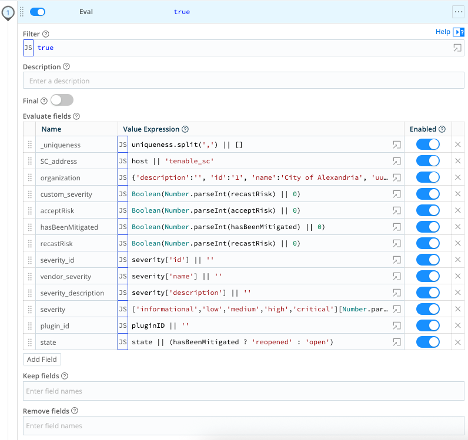
<p><strong>Eval Function</strong> – The first function in the pipeline does a number of manipulations of fields on the event. This includes additional parsing, hard coding information and changing values to a human readable string.</p>

<table>
  <tbody>
    <tr>
      <td><strong>Name</strong></td>
      <td><strong>Value Expression</strong></td>
    </tr>
    <tr>
      <td>_uniqueness</td>
      <td><code class="language-plaintext highlighter-rouge">uniqueness.split(',') || []</code></td>
    </tr>
    <tr>
      <td>SC_address</td>
      <td><code class="language-plaintext highlighter-rouge">host || 'tenable_sc'</code></td>
    </tr>
    <tr>
      <td>organization (This should match the customer’s organization info. Example provided here.)</td>
      <td><code class="language-plaintext highlighter-rouge">{'description':'', 'id':'1', 'name':'Acme Corporation', 'uuid':'A123BC4D-1234-5678-9012-1AB2CDE34EA1'}</code></td>
    </tr>
    <tr>
      <td>custom_severity</td>
      <td><code class="language-plaintext highlighter-rouge">Boolean(Number.parseInt(recastRisk) || 0)</code></td>
    </tr>
    <tr>
      <td>acceptRisk</td>
      <td><code class="language-plaintext highlighter-rouge">Boolean(Number.parseInt(acceptRisk) || 0)</code></td>
    </tr>
    <tr>
      <td>hasBeenMitigated</td>
      <td><code class="language-plaintext highlighter-rouge">Boolean(Number.parseInt(hasBeenMitigated) || 0)</code></td>
    </tr>
    <tr>
      <td>recastRisk</td>
      <td><code class="language-plaintext highlighter-rouge">Boolean(Number.parseInt(recastRisk) || 0)</code></td>
    </tr>
    <tr>
      <td>severity_id</td>
      <td><code class="language-plaintext highlighter-rouge">severity['id'] || ''</code></td>
    </tr>
    <tr>
      <td>vendor_severity</td>
      <td><code class="language-plaintext highlighter-rouge">severity['name'] || ''</code></td>
    </tr>
    <tr>
      <td>severity_description</td>
      <td><code class="language-plaintext highlighter-rouge">severity['description'] || ''</code></td>
    </tr>
    <tr>
      <td>severity</td>
      <td><code class="language-plaintext highlighter-rouge">['informational','low','medium','high','critical'][Number.parseInt(severity_id)] || ''</code></td>
    </tr>
    <tr>
      <td>plugin_id</td>
      <td><code class="language-plaintext highlighter-rouge">pluginID || ''</code></td>
    </tr>
    <tr>
      <td>state</td>
      <td><code class="language-plaintext highlighter-rouge">state || (hasBeenMitigated ? 'reopened' : 'open')</code></td>
    </tr>
  </tbody>
</table>

<p><img src="/assets/images/posts/cribl_tenable_sc/tenable_sc_vuln_eval.png" alt="Eval statements for the tenable_sc_vuln" /></p>

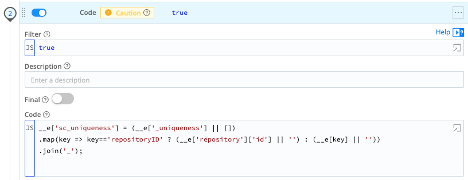
<p><strong>Code Function</strong> – The Splunk TA generates a field called <code class="language-plaintext highlighter-rouge">sc_uniqueness</code>. This is based on the fields that Tenable provided in the <code class="language-plaintext highlighter-rouge">uniqueness</code> field, which we split into an array and stored in <code class="language-plaintext highlighter-rouge">_uniqueness</code>. This code function walks through each of those field names and attempts to pull the value from the event. It then creates an underscore separated value with those field values.</p>

<div class="language-javascript highlighter-rouge"><div class="highlight"><pre class="highlight"><code><span class="nx">__e</span><span class="p">[</span><span class="dl">'</span><span class="s1">sc_uniqueness</span><span class="dl">'</span><span class="p">]</span> <span class="o">=</span> <span class="p">(</span><span class="nx">__e</span><span class="p">[</span><span class="dl">'</span><span class="s1">_uniqueness</span><span class="dl">'</span><span class="p">]</span> <span class="o">||</span> <span class="p">[])</span>
<span class="p">.</span><span class="nf">map</span><span class="p">(</span><span class="nx">key</span> <span class="o">=&gt;</span> <span class="nx">key</span><span class="o">==</span><span class="dl">'</span><span class="s1">repositoryID</span><span class="dl">'</span> <span class="p">?</span> <span class="p">(</span><span class="nx">__e</span><span class="p">[</span><span class="dl">'</span><span class="s1">repository</span><span class="dl">'</span><span class="p">][</span><span class="dl">'</span><span class="s1">id</span><span class="dl">'</span><span class="p">]</span> <span class="o">||</span> <span class="dl">''</span><span class="p">)</span> <span class="p">:</span> <span class="p">(</span><span class="nx">__e</span><span class="p">[</span><span class="nx">key</span><span class="p">]</span> <span class="o">||</span> <span class="dl">''</span><span class="p">))</span>
<span class="p">.</span><span class="nf">join</span><span class="p">(</span><span class="dl">'</span><span class="s1">_</span><span class="dl">'</span><span class="p">);</span>
</code></pre></div></div>

<p><img src="/assets/images/posts/cribl_tenable_sc/tenable_sc_vuln_code.png" alt="Code function for the tenable_sc_vuln" /></p>

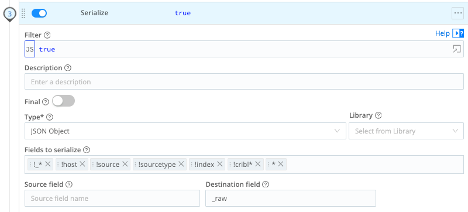
<p><strong>Serialize Function</strong> – This function takes all the data changes and rewrites the raw event as a new JSON representation of the data.</p>

<ul>
  <li>Type = JSON Object</li>
  <li>Fields to serialize:
    <ul>
      <li><code class="language-plaintext highlighter-rouge">!_*</code></li>
      <li><code class="language-plaintext highlighter-rouge">!host</code></li>
      <li><code class="language-plaintext highlighter-rouge">!source</code></li>
      <li><code class="language-plaintext highlighter-rouge">!sourcetype</code></li>
      <li><code class="language-plaintext highlighter-rouge">!index</code></li>
      <li><code class="language-plaintext highlighter-rouge">!cribl*</code></li>
      <li><code class="language-plaintext highlighter-rouge">*</code></li>
    </ul>
  </li>
  <li>Destination field = <code class="language-plaintext highlighter-rouge">_raw</code></li>
</ul>

<p><img src="/assets/images/posts/cribl_tenable_sc/tenable_sc_vuln_serialize.png" alt="Serialize function for the tenable_sc_vuln" /></p>

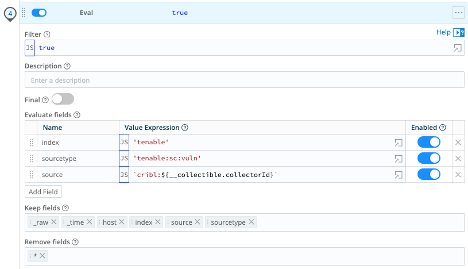
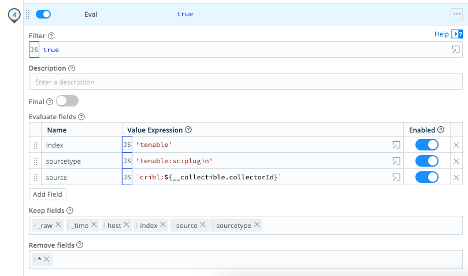
<p><strong>Eval Function</strong> – The final eval function sets all the meta data that we need for Splunk and removes all other fields.</p>

<table>
  <tbody>
    <tr>
      <td><strong>Name</strong></td>
      <td><strong>Value Expression</strong></td>
    </tr>
    <tr>
      <td>index</td>
      <td><code class="language-plaintext highlighter-rouge">'tenable'</code> (Be sure to set this to the Splunk index for your environment)</td>
    </tr>
    <tr>
      <td>sourcetype</td>
      <td><code class="language-plaintext highlighter-rouge">'tenable:sc:vuln'</code></td>
    </tr>
    <tr>
      <td>source</td>
      <td><code class="language-plaintext highlighter-rouge">`cribl:${__collectible.collectorId}`</code></td>
    </tr>
  </tbody>
</table>

<ul>
  <li>Keep fields:
    <ul>
      <li><code class="language-plaintext highlighter-rouge">_raw</code></li>
      <li><code class="language-plaintext highlighter-rouge">_time</code></li>
      <li><code class="language-plaintext highlighter-rouge">host</code></li>
      <li><code class="language-plaintext highlighter-rouge">index</code></li>
      <li><code class="language-plaintext highlighter-rouge">source</code></li>
      <li><code class="language-plaintext highlighter-rouge">sourcetype</code></li>
    </ul>
  </li>
  <li>Remove fields:
    <ul>
      <li><code class="language-plaintext highlighter-rouge">*</code></li>
    </ul>
  </li>
</ul>

<p><img src="/assets/images/posts/cribl_tenable_sc/tenable_sc_vuln_eval_final.png" alt="Final eval statements for the tenable_sc_vuln" /></p>

<h2 id="tenable_sc_asset-2">tenable_sc_asset</h2>

<p>The next pipeline is for processing logs from the tenable_sc_asset collector.</p>

<p><strong>Eval Function</strong> – The first function in the pipeline does a minimal amount of field manipulation of the data.</p>

<table>
  <tbody>
    <tr>
      <td><strong>Name</strong></td>
      <td><strong>Value Expression</strong></td>
    </tr>
    <tr>
      <td>_uniqueness</td>
      <td><code class="language-plaintext highlighter-rouge">uniqueness.split(',') || []</code></td>
    </tr>
    <tr>
      <td>SC_address</td>
      <td><code class="language-plaintext highlighter-rouge">host || 'tenable_sc'</code></td>
    </tr>
    <tr>
      <td>organization (This should match the customer’s organization info. Example provided here.)</td>
      <td><code class="language-plaintext highlighter-rouge">{'description':'', 'id':'1', 'name':'Acme Corporation', 'uuid':'A123BC4D-1234-5678-9012-1AB2CDE34EA1'}</code></td>
    </tr>
  </tbody>
</table>

<p><strong>Code Function</strong> – This pipeline uses the same code function as above to create the sc_uniqueness field.</p>

<p><strong>Serialize Function</strong> – This pipeline uses the same Serialize function as above to rewrite the _raw event.</p>

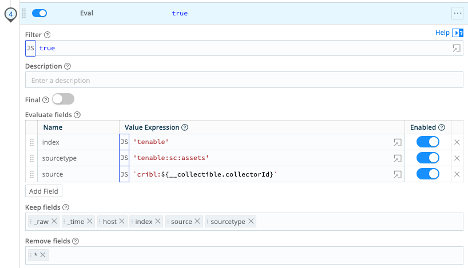
<p><strong>Eval Function</strong> – Finally, we set the meta for Splunk.</p>

<table>
  <tbody>
    <tr>
      <td><strong>Name</strong></td>
      <td><strong>Value Expression</strong></td>
    </tr>
    <tr>
      <td>index</td>
      <td><code class="language-plaintext highlighter-rouge">'tenable'</code> (Be sure to set this to the Splunk index for your environment)</td>
    </tr>
    <tr>
      <td>sourcetype</td>
      <td><code class="language-plaintext highlighter-rouge">'tenable:sc:assets'</code></td>
    </tr>
    <tr>
      <td>source</td>
      <td><code class="language-plaintext highlighter-rouge">`cribl:${__collectible.collectorId}`</code></td>
    </tr>
  </tbody>
</table>

<ul>
  <li>Keep fields:
    <ul>
      <li><code class="language-plaintext highlighter-rouge">_raw</code></li>
      <li><code class="language-plaintext highlighter-rouge">_time</code></li>
      <li><code class="language-plaintext highlighter-rouge">host</code></li>
      <li><code class="language-plaintext highlighter-rouge">index</code></li>
      <li><code class="language-plaintext highlighter-rouge">source</code></li>
      <li><code class="language-plaintext highlighter-rouge">sourcetype</code></li>
    </ul>
  </li>
  <li>Remove fields:
    <ul>
      <li><code class="language-plaintext highlighter-rouge">*</code></li>
    </ul>
  </li>
</ul>

<p><img src="/assets/images/posts/cribl_tenable_sc/tenable_sc_asset_eval_final.png" alt="Final eval statements for the tenable_sc_asset" /></p>

<h2 id="tenable_sc_plugin-2">tenable_sc_plugin</h2>

<p>The final pipeline is for processing logs from the tenable_sc_plugin collector.</p>

<p><strong>Eval Function</strong> – The first function in the pipeline does a minimal amount of field manipulation of the data.</p>

<table>
  <tbody>
    <tr>
      <td><strong>Name</strong></td>
      <td><strong>Value Expression</strong></td>
    </tr>
    <tr>
      <td>_uniqueness</td>
      <td><code class="language-plaintext highlighter-rouge">uniqueness.split(',') || []</code></td>
    </tr>
    <tr>
      <td>SC_address</td>
      <td><code class="language-plaintext highlighter-rouge">host || 'tenable_sc'</code></td>
    </tr>
    <tr>
      <td>organization (This should match the customer’s organization info. Example provided here.)</td>
      <td><code class="language-plaintext highlighter-rouge">{'description':'', 'id':'1', 'name':'Acme Corporation', 'uuid':'A123BC4D-1234-5678-9012-1AB2CDE34EA1'}</code></td>
    </tr>
  </tbody>
</table>

<p><strong>Code Function</strong> – This pipeline uses the same code function as above to create the sc_uniqueness field.</p>

<p><strong>Serialize Function</strong> – This pipeline uses the same Serialize function as above to rewrite the _raw event.</p>

<p><strong>Eval Function</strong> – Finally, we set the meta for Splunk.</p>

<table>
  <tbody>
    <tr>
      <td><strong>Name</strong></td>
      <td><strong>Value Expression</strong></td>
    </tr>
    <tr>
      <td>index</td>
      <td><code class="language-plaintext highlighter-rouge">'tenable'</code> (Be sure to set this to the Splunk index for your environment)</td>
    </tr>
    <tr>
      <td>sourcetype</td>
      <td><code class="language-plaintext highlighter-rouge">'tenable:sc:plugin'</code></td>
    </tr>
    <tr>
      <td>source</td>
      <td><code class="language-plaintext highlighter-rouge">`cribl:${__collectible.collectorId}`</code></td>
    </tr>
  </tbody>
</table>

<ul>
  <li>Keep fields:
    <ul>
      <li><code class="language-plaintext highlighter-rouge">_raw</code></li>
      <li><code class="language-plaintext highlighter-rouge">_time</code></li>
      <li><code class="language-plaintext highlighter-rouge">host</code></li>
      <li><code class="language-plaintext highlighter-rouge">index</code></li>
      <li><code class="language-plaintext highlighter-rouge">source</code></li>
      <li><code class="language-plaintext highlighter-rouge">sourcetype</code></li>
    </ul>
  </li>
  <li>Remove fields:
    <ul>
      <li><code class="language-plaintext highlighter-rouge">*</code></li>
    </ul>
  </li>
</ul>

<p><img src="/assets/images/posts/cribl_tenable_sc/tenable_sc_plugin_eval_final.png" alt="Final eval statements for the tenable_sc_plugin" /></p>

<h1 id="create-your-routes">Create Your Routes</h1>

<p>With all of the infrastructure above setup, you can finish your implementation by creating routes that connect your new collectors to Splunk, using the pipelines defined above.</p>

<h1 id="tenable-api-references">Tenable API References</h1>

<ul>
  <li>Tenable Security Center API: Analysis - <a href="https://docs.tenable.com/security-center/api/Analysis.htm" target="_blank">https://docs.tenable.com/security-center/api/Analysis.htm</a></li>
  <li>Tenable Security Center API: Plugin - <a href="https://docs.tenable.com/security-center/api/Plugin.htm" target="_blank">https://docs.tenable.com/security-center/api/Plugin.htm</a></li>
  <li>Retrieve Vulnerability Data for a Specific Time Range - <a href="https://docs.tenable.com/security-center/best-practices/api/Content/RetrieveVulnerabilityDataForSpecificTimeRange.htm" target="_blank">https://docs.tenable.com/security-center/best-practices/api/Content/RetrieveVulnerabilityDataForSpecificTimeRange.htm</a></li>
  <li>Retrieve Asset Data from Tenable Security Center - <a href="https://docs.tenable.com/security-center/best-practices/api/Content/RetrieveAssetDataFromSC.htm" target="_blank">https://docs.tenable.com/security-center/best-practices/api/Content/RetrieveAssetDataFromSC.htm</a></li>
</ul>]]></content><author><name>Tom Kreiner</name></author><category term="Cribl" /><category term="Tenable" /><summary type="html"><![CDATA[Use REST Collectors in Cribl to pull scan, asset and plugin data from Tenable SC.]]></summary></entry><entry><title type="html">11/18/2019 Baltimore Splunk User Group</title><link href="https://www.aplura.com/news/usergroup/2019/11/18/11182019-baltimore-splunk-user-group.html" rel="alternate" type="text/html" title="11/18/2019 Baltimore Splunk User Group" /><published>2019-11-18T18:35:25-05:00</published><updated>2019-11-18T18:35:25-05:00</updated><id>https://www.aplura.com/news/usergroup/2019/11/18/11182019-baltimore-splunk-user-group</id><content type="html" xml:base="https://www.aplura.com/news/usergroup/2019/11/18/11182019-baltimore-splunk-user-group.html"><![CDATA[<p>We will be meeting at Skyline Technology Solutions, 6956-F Aviation Blvd, Glen Burnie, MD 21061!</p>

<p>Topic of the month is .conf19! We will review what’s new and recently announced and also get an insight from employees on their first professional technology conference!</p>

<p>Speakers:</p>

<ul>
  <li>Sulove Khanal (Aplura, LLC) <a href="/assets/pdf/First_Splunk_Conference.pdf">PDF</a></li>
  <li>Steven Bochniewicz <a href="/assets/pdf/Conf19_Recap.pdf">PDF</a></li>
</ul>]]></content><author><name></name></author><category term="Usergroup" /><summary type="html"><![CDATA[Baltimore Splunk User Group meeting information for November, 2019.]]></summary></entry><entry><title type="html">Aplura’s consultants and developers inducted into SplunkTrust 2020</title><link href="https://www.aplura.com/news/splunk/splunktrust/community/awards/2019/11/11/aplura_splunk_trust_2019.html" rel="alternate" type="text/html" title="Aplura’s consultants and developers inducted into SplunkTrust 2020" /><published>2019-11-11T11:00:00-05:00</published><updated>2019-11-11T11:00:00-05:00</updated><id>https://www.aplura.com/news/splunk/splunktrust/community/awards/2019/11/11/aplura_splunk_trust_2019</id><content type="html" xml:base="https://www.aplura.com/news/splunk/splunktrust/community/awards/2019/11/11/aplura_splunk_trust_2019.html"><![CDATA[<p>In what’s become an annual .conf tradition around here, Aplura wants to
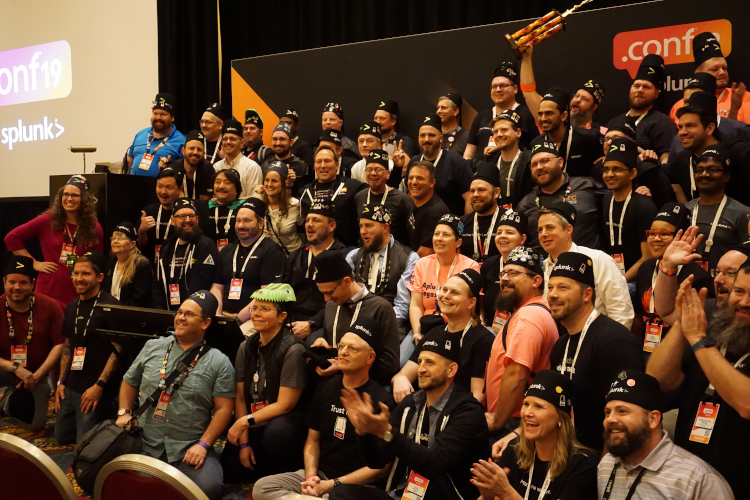
congratulate three of our team that inducted into the SplunkTrust, 2020 cohort.</p>

<p><img src="/assets/images/trust2020.png" alt="SplunkTrust 2020 Induction" /></p>

<p>Our team members are:</p>

<ul>
  <li>Nancy Kafer</li>
  <li>David Shpritz</li>
  <li>Kyle Smith</li>
</ul>

<p>We would also like to congratulate and thank the other <a href="https://www.splunk.com/blog/2019/10/21/we-proudly-announce-the-splunktrust-2020-membership.html">SplunkTrustees</a>. SplunkTrust members represent the most helpful members of the Splunk community.
That might mean posts to <a href="https://answers.splunk.com">Answers</a>, contributing to <a href="https://splunkbase.splunk.com">Splunkbase</a>, or helping folks out on the <a href="http://splk.it/slack">Splunk User Groups Slack Team</a>.</p>

<p>SplunkTrustees are what make the Splunk Community so great, and we are proud to have three of them in the Aplura family.</p>]]></content><author><name>Aplura, LLC.</name></author><category term="Splunk" /><category term="SplunkTrust" /><category term="Community" /><category term="Awards" /><summary type="html"><![CDATA[Aplura's consultants and developers inducted into SplunkTrust 2020]]></summary></entry><entry><title type="html">Splunk Community shows its Appreciation to an Aplura Consultant</title><link href="https://www.aplura.com/news/splunk/splunktrust/community/awards/2019/11/11/splunk_community_shows_appreciation.html" rel="alternate" type="text/html" title="Splunk Community shows its Appreciation to an Aplura Consultant" /><published>2019-11-11T11:00:00-05:00</published><updated>2019-11-11T11:00:00-05:00</updated><id>https://www.aplura.com/news/splunk/splunktrust/community/awards/2019/11/11/splunk_community_shows_appreciation</id><content type="html" xml:base="https://www.aplura.com/news/splunk/splunktrust/community/awards/2019/11/11/splunk_community_shows_appreciation.html"><![CDATA[<p>At Aplura, we feel that supporting user communities is important. That’s why we have <a href="/news/splunk/splunktrust/community/awards/2019/11/11/aplura_splunk_trust_2019.html">three SplunkTrustees on staff</a>.</p>

<p>That’s also why we are so proud that during .conf19, the Splunk Community presented our Director of Services, Dave Shpritz with a special award.</p>

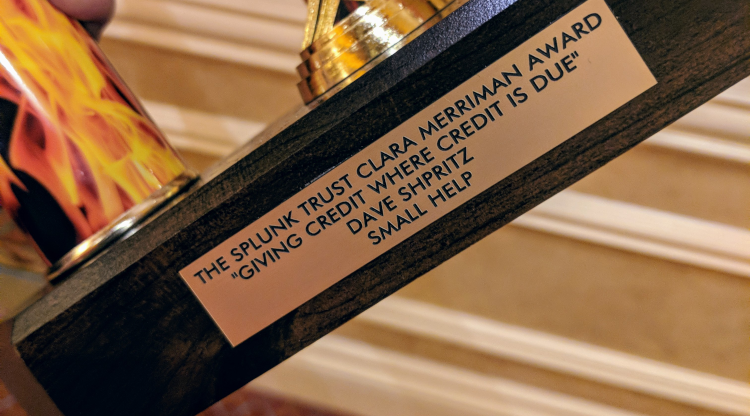
<p><img src="/assets/images/clara_plate.png" alt="Plate on the Clara" /></p>

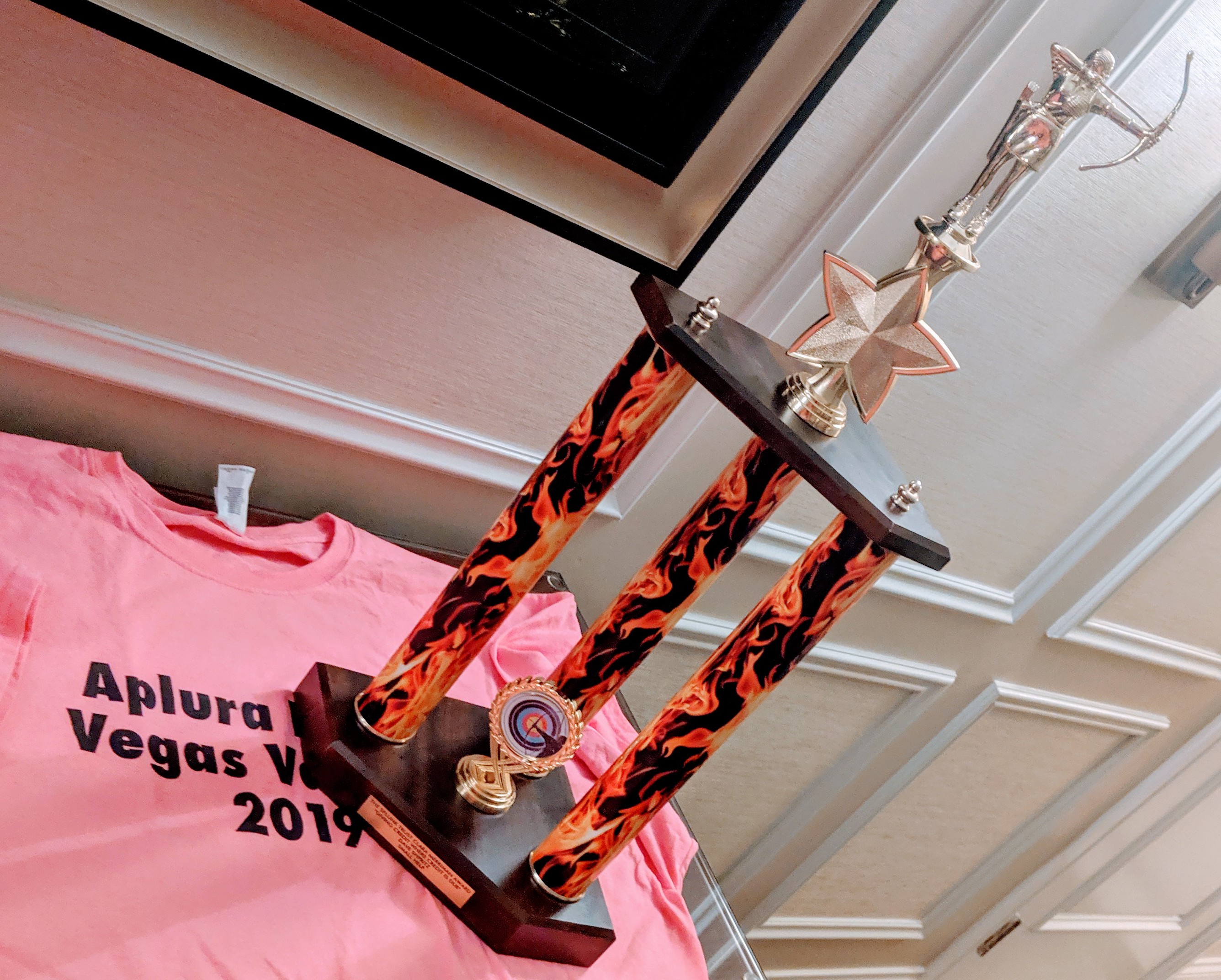
<p>Dave helps to administer and moderate the Splunk User Groups Slack team, which at times can be a thankless and time consuming task. Well, the <a href="https://www.splunk.com/en_us/community/splunk-trust.html">SplunkTrust</a> and the <a href="https://www.splunk.com/en_us/community.html">community</a> gave him a big “Thank You” in the form of a tall trophy. With flames.</p>

<p><img src="/assets/images/the_clara.jpg" alt="The Clara" /></p>

<p>We’ve always known that Dave puts in extra effort for our consultants, the community, and even Splunk itself. We are proud that now he has a trophy to prove it.</p>]]></content><author><name>Aplura, LLC.</name></author><category term="Splunk" /><category term="SplunkTrust" /><category term="Community" /><category term="Awards" /><summary type="html"><![CDATA[Splunk Community gives Dave Shpritz a special award.]]></summary></entry><entry><title type="html">9/23/2019 Baltimore Splunk User Group</title><link href="https://www.aplura.com/news/usergroup/2019/09/23/baltimore-splunk-user-group.html" rel="alternate" type="text/html" title="9/23/2019 Baltimore Splunk User Group" /><published>2019-09-23T08:00:00-04:00</published><updated>2019-09-23T08:00:00-04:00</updated><id>https://www.aplura.com/news/usergroup/2019/09/23/baltimore-splunk-user-group</id><content type="html" xml:base="https://www.aplura.com/news/usergroup/2019/09/23/baltimore-splunk-user-group.html"><![CDATA[<p>September meeting! Due to conflicts, this meeting is on Sep 23. We will meet in Towson, and I’ll practice my .conf talk (Lesser Known) ! Also food and drinks, and social!</p>]]></content><author><name></name></author><category term="Usergroup" /><summary type="html"><![CDATA[Baltimore Splunk User Group meeting information.]]></summary></entry><entry><title type="html">8/19/2019 Baltimore Splunk User Group</title><link href="https://www.aplura.com/news/usergroup/2019/08/19/baltimore-splunk-user-group.html" rel="alternate" type="text/html" title="8/19/2019 Baltimore Splunk User Group" /><published>2019-08-19T08:00:00-04:00</published><updated>2019-08-19T08:00:00-04:00</updated><id>https://www.aplura.com/news/usergroup/2019/08/19/baltimore-splunk-user-group</id><content type="html" xml:base="https://www.aplura.com/news/usergroup/2019/08/19/baltimore-splunk-user-group.html"><![CDATA[<p>HI THERE! We will meet in the Albert Einstein Classroom, HCLS Savage Branch, 9525 Durness Lane, Laurel MD 20723. Please RSVP, so we can get accurate count. Thanks!</p>]]></content><author><name></name></author><category term="Usergroup" /><summary type="html"><![CDATA[Baltimore Splunk User Group meeting information.]]></summary></entry><entry><title type="html">7/15/2019 Baltimore Splunk User Group</title><link href="https://www.aplura.com/news/usergroup/2019/07/15/baltimore-splunk-user-group.html" rel="alternate" type="text/html" title="7/15/2019 Baltimore Splunk User Group" /><published>2019-07-15T08:00:00-04:00</published><updated>2019-07-15T08:00:00-04:00</updated><id>https://www.aplura.com/news/usergroup/2019/07/15/baltimore-splunk-user-group</id><content type="html" xml:base="https://www.aplura.com/news/usergroup/2019/07/15/baltimore-splunk-user-group.html"><![CDATA[<p>HI THERE! We will meet in the Patapsco meeting room 9421 Frederick Rd Ellicott City MD 21042 Miller branch. Please RSVP, so we can get accurate count.</p>

<p>Thanks!</p>]]></content><author><name></name></author><category term="Usergroup" /><summary type="html"><![CDATA[Baltimore Splunk User Group meeting information.]]></summary></entry></feed>